
Bring the meters you have
We'll tell you honestly what we can read.
Managing agents and portfolios
All your schemes in one place. Spot leaks, losses and silent meters across every site. Onboard a complex from spreadsheets, and let the month-end run itself while you approve the exceptions.
A 30‑minute video call with the founder. Bring two schemes' meter lists.
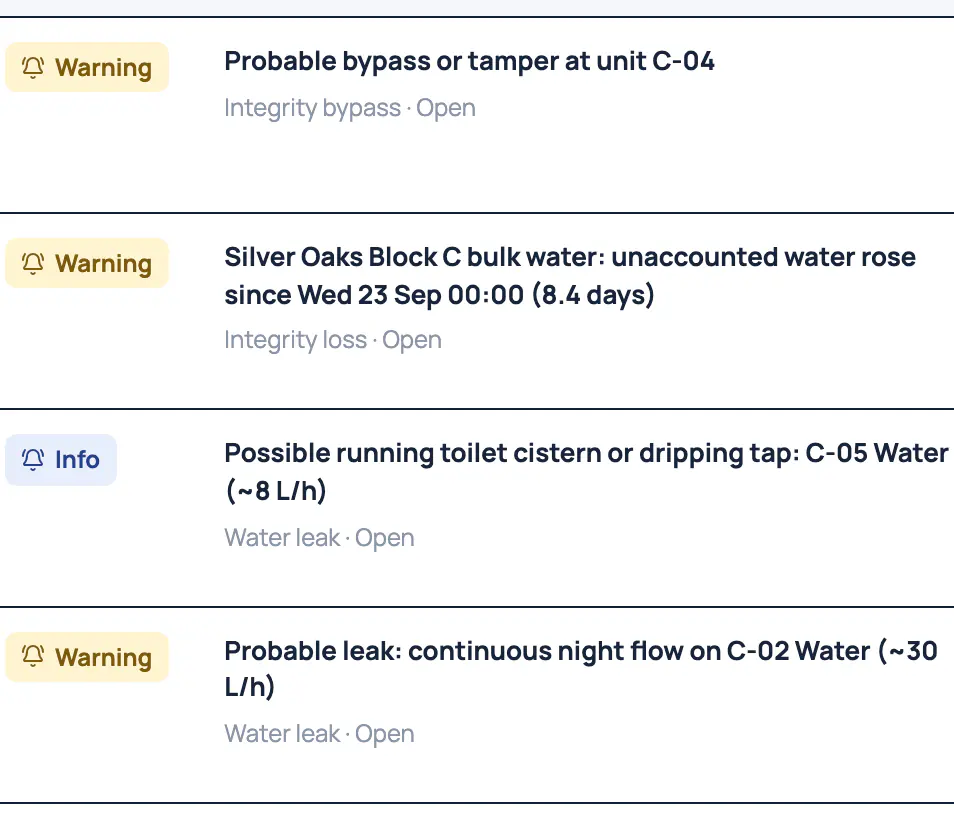
We set up the rules with you.
Every scheme's meters, tenants and access in one place.
Leaks, losses and silent meters across sites.
Valves and relays, with one switch that stops every automation.
A month-end that runs itself; you approve the exceptions.
What the labels mean
Built and tested. We're choosing our first pilot sites.See what's built
Bill and collect
The software runs the steps: validate, draft, issue, remind and reconcile. You decide the exceptions. Issuing waits while a warning or critical exception is open.

Missing readings, a missing tariff or a pending move-out become exceptions with a suggested fix.
At 7, 21 and 35 days, then they stop. The wording is tested never to mention disconnection.
Faults and call-outs become work orders with a due time set by priority. Overdue ones are flagged.
Catch problems early
Every scheme's alerts arrive in one inbox, each linked to its meter and its evidence. When the meters behind one gateway go quiet together, Utilitize says it's probably the gateway, not a power cut.
Probable bypass, unaccounted water, running cisterns and night-flow leaks, marked by severity, with acknowledge and resolve.
A gateway fault, an outage or load-shedding, each with how sure we are. A silent meter isn't called a power cut.
Water flowing all night is flagged after three nights; a burst within hours.
Where a scheme has a check meter: the unit whose meter dropped when the loss began, with the evidence.
See everything
From six spreadsheets: sites, units, meters, tariffs, occupants and billing accounts. A dry run checks every row, the apply is all or nothing, and a batch can be undone. Installers see each meter's first reading before they leave site.
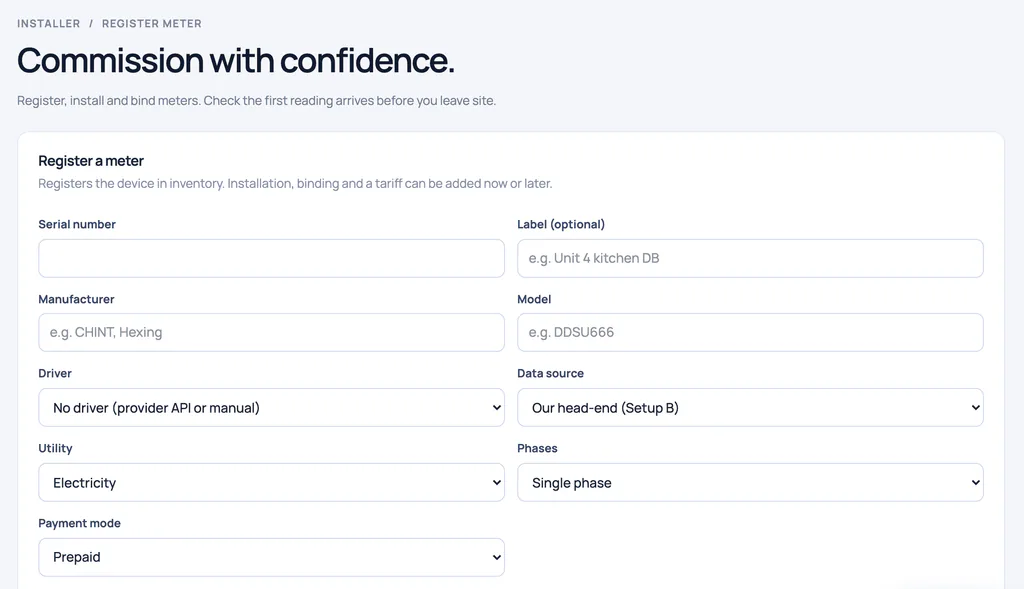
Importing the same rows twice creates nothing twice, so a fix and a re-run are safe.
Register, install and bind a meter, then see its first reading arrive before leaving site.
Scan the label, watch the first reading arrive, and sign a certificate on the installer's phone.
See everything
End a lease from a set date, keep the history and invite the next tenant. Staff access has end dates, and every change lands in an audit log that shows tampering.

Ending a tenancy doesn't delete it. The new tenant sets their own password from an invite.
Roles by scheme, unit or customer, with end dates. "View as" shows a banner, and both names go in the log.
See everything
Bureaus and metering operators can run all their meters on Utilitize, each client walled off from the next. Owners of many solar roofs see every site's import, export and export alerts in one place.
Bureaus and operators run their clients' meters here, each client walled off from the next, tested in the software and in the database.
When a scheme moves to a new customer account, its meters and history move with it. We do it for you today.
Every site's import, export and export-drop alerts on one portfolio overview.
Solar, grid and battery figures from one inverter make's cloud, with each owner's own access. Other inverters are in preparation.
Control what matters
Valves and relays show the state the meter confirmed, not the one that was asked for. Real hardware starts switched off. One switch stops every automation at once.
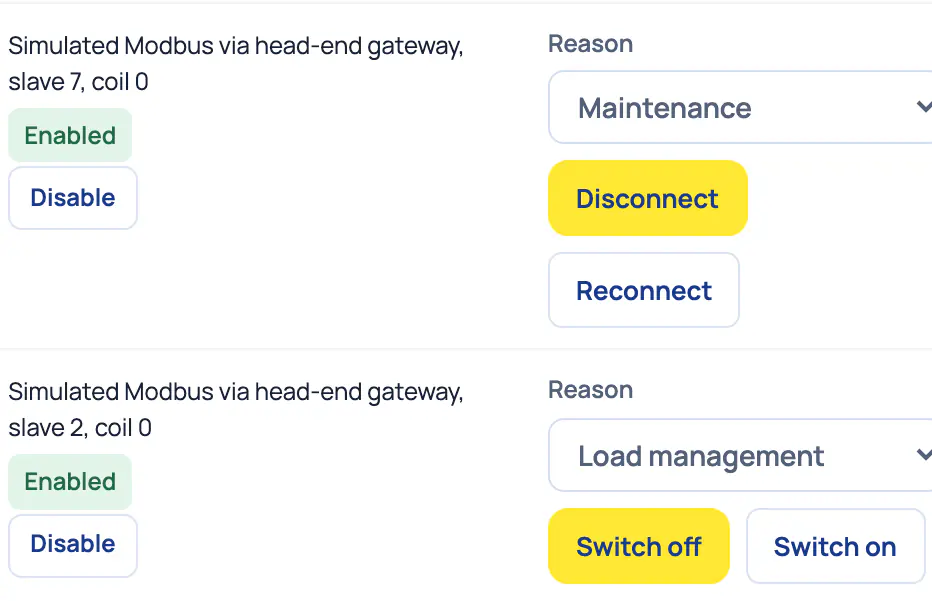
Every command carries a reason and counts as done only when the meter confirms it.
Where a smart valve is fitted, a burst closes the water and everyone at home is told. One tap reopens it.
Households set it themselves: the water closes, the geyser switches off, and everything is restored before they're back.
A fictional example
On Utilitize's fictional demo data. Where a figure appears on a screen on this page, it's quoted from that capture.
07:30
The control tower lists four open exceptions, such as missing readings or no tariff, each with a suggested fix.
08:15
Several meters at one block went quiet together. Utilitize flags a probable communication fault at their gateway, so one work order goes out instead of one per meter.
10:00
A contractor's job is past its due time, and the control tower flags it as overdue.
14:00
The dry run reports on every row before anything is created. Then the batch applies all or nothing, and it can be undone.
16:30
Six billing cycles wait for a decision, most of them for review and approval. Issuing waits until their exceptions are cleared.
No real agency, scheme or person. The software runs the steps; people make the decisions.
On site
What a portfolio needs, scheme by scheme. We look at each site's meters with you first.
A meter list per scheme
Models, serial numbers and how they're read today. The six spreadsheet templates take it from there.
Smart meters that report every half‑hour
Keypad meters can't give half‑hourly data.
A way for readings to reach us
Meters on a provider's network, or a gateway per distribution board.
A check meter per bulk supplyPer scheme
Only where you want loss and bypass signals.
Valves and relaysOptional
Only where you want shut-off, schedules or holiday mode.
We'll tell you honestly what we can read.
We're working on options for keypad sites. Tell us about your meters.
Questions
Each client's data is walled off from the next, tested in the software and in the database. Managing agents, bureaus and installers each run their own organisation and see only their own schemes.
The software runs the steps and your team approves the exceptions, so the decisions stay with you. Prefer us to own and look after the meters? Ask about our managed option.
Yes, from six spreadsheet templates: sites, units, meters, tariff assignments, occupants and billing accounts. A dry run checks every row first, the apply is all or nothing, and a batch can be undone.
We're working on options for keypad sites. Tell us about your meters and join the keypad list.
Keypad meters can't give half‑hourly data, so the loss and leak signals need smart meters.
Revoke their access in one step; it's recorded, never deleted. Grants can carry an end date, and money or access changes need a fresh identity check.
It's enough to see onboarding, the control tower and the alerts on real screens. If your portfolio needs longer, we'll book a follow-up.
Bring two schemes' meter lists.