
On prepaid instead?
On smart meters there's no token to type. Tenants top up in two taps, and the meter confirms the power is on.
How it works
Sub-metering gives every unit its own meter, so each one pays for what it used. On Utilitize, smart meters report every half-hour and the month-end bills from actual readings. Here are the six steps, what we need from you and how long it takes.
Timings are estimates. We confirm yours after a survey.
Step by step
Six steps, each with what we need from you. The screens are real, with fictional data.
What the labels mean
Built and tested. We're choosing our first pilot sites.See what's built
Step 1 of 6
Send us what you have. We'll tell you honestly which meters we can read, what we'd add and what it would take.
Keypad meters? We're working on options for keypad sites. Join the keypad list
What to send us
Bring to the walkthrough
Step 2 of 6
Where new meters are needed, a registered electrician fits them to our specification. Your installer registers each meter, binds it to its readings and sees the first reading arrive before leaving site.
What we need from you
Access to the meters and distribution boards on installation day.
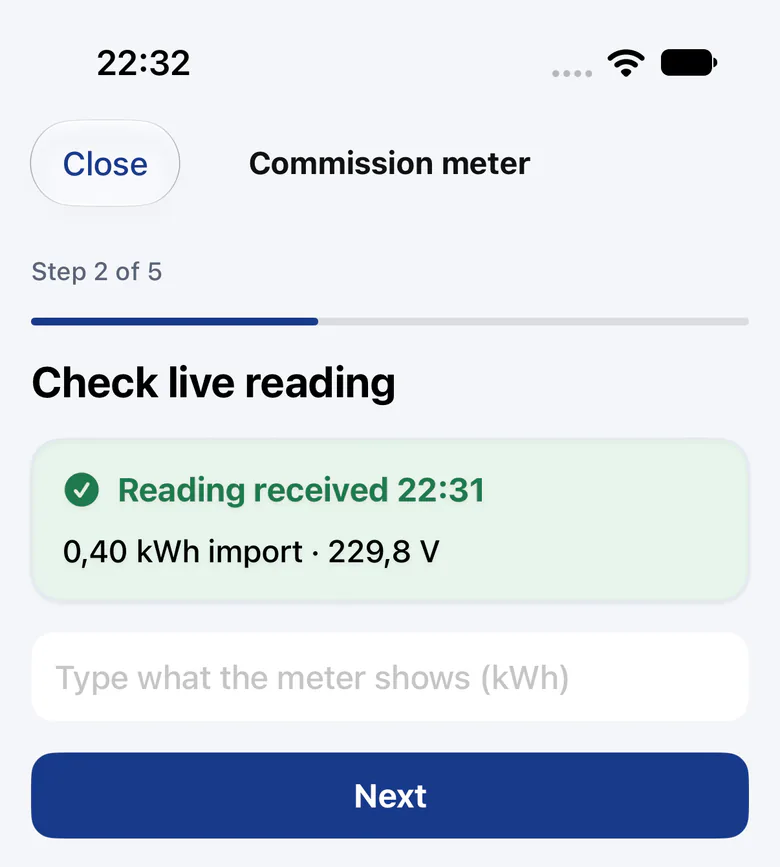
Tested against a simulated server so far.
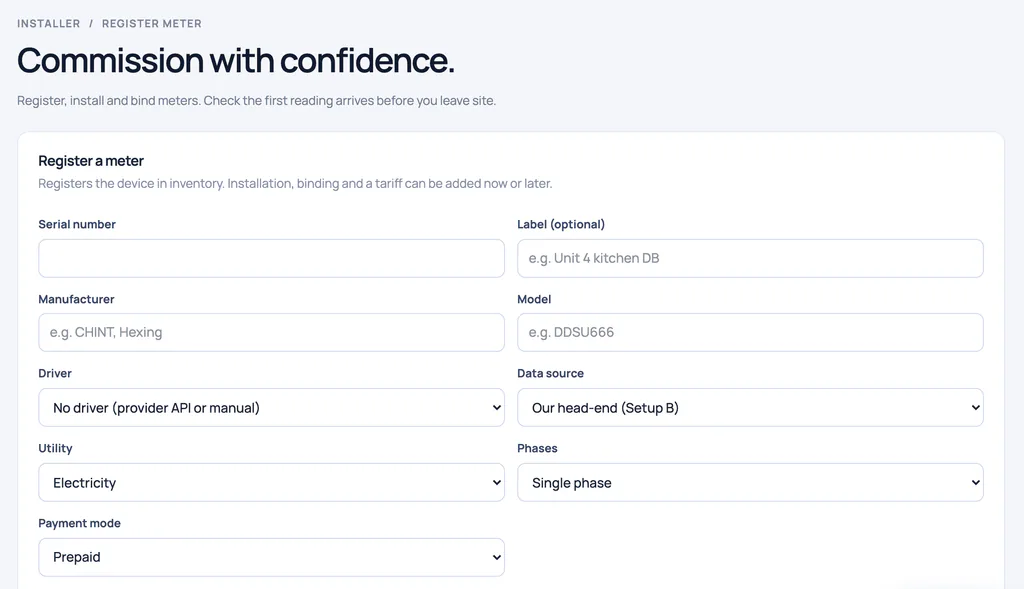
Step 3 of 6
Sites, units, meters, tariffs, occupants and billing accounts come in from six spreadsheets. A dry run checks every row first. Then it all goes in or nothing does, and a batch can be undone.
What we need from you
Your unit and meter lists, and who to bill for each unit. We send you the templates.
Diagram, not a product screen.
Step 4 of 6
Each site's municipal tariffs are loaded as dated versions: fixed, stepped or time-of-use, with fixed charges and VAT. We preview each tariff against your meters' real usage before the first bill.
What we need from you
Your latest municipal bill, so we load the tariffs you're actually charged.
Tariffs are illustrative until each site's are loaded.
Diagram, not a product screen. Demo tariffs are illustrative until each site's municipal tariffs are loaded.
Step 5 of 6
Each tenancy gets an invite link, and residents set their own password. Ending a tenancy keeps its history, and a new tenant never sees the previous tenant's data. Residents can't see each other's accounts.
What we need from you
Who lives in each unit. You pass each resident their invite link.

Step 6 of 6
The software runs the month-end. It checks the readings, raises exceptions such as a missing reading or a missing tariff, and drafts the bills. You approve the exceptions. Statements use actual readings, and an incomplete statement is held back, never sent quietly.
What we need from you
Someone to approve the exceptions: a trustee, your managing agent or you.
Statements reach residents in the app until email and SMS switch on.
On smart meters there's no token to type. Tenants top up in two taps, and the meter confirms the power is on.

What you need on site
It depends on what you want to see and control. Here's what each part gives you, and its status today.
Bring the meters you have, and we'll tell you honestly what we can read. We read real smart meters at a test site today, read-only, through their provider's network.
A gateway on the distribution board reads the meters on it, through our drivers for the common meter protocols.
It lets us compare the bulk supply with the units, half-hour by half-hour, so losses show up with the evidence.
With 30-minute readings, water flowing all night is flagged after three nights, and a burst within hours.
A smart valve for burst shut-off and holiday mode, and a relay for a geyser schedule. A command counts as done only when the meter confirms it.
We're working on options for keypad sites. Tell us about your meters.
A registered electrician fits them to our specification, and we check every meter's first reading.
We specify the meters and quote the hardware per site after a survey, so you know the cost before anything is fitted.
Managed
We supply, own and look after the meters, and the software runs your month-end; you approve the exceptions.
Platform
You buy the meters from us and run them yourself on Utilitize.
We quote both after a site survey.
Timeline (estimate)
Every property is different, so treat this as an estimate. We confirm your dates after the survey.
Week 1
Send us what you have, and we'll tell you what we can read.
Weeks 1–2
A 30-minute walkthrough on demo data, then a proposal for your property, with the hardware quoted after a survey.
Your next meeting
Your trustees, board or owner decide. In a sectional-title scheme, prepaid meters on common property need a special resolution, with at least 60 days' notice to owners and occupiers (PMR 29(4)).
Our resolution pack drafts the wording and a three-year cost projection.
A template: have it reviewed.
Installation
Dates depend on the hardware. Every meter's first reading is checked before the installer leaves.
One month
Utilitize runs beside your current billing for a month, so you can compare the two.
Then
Residents get their invites, and the month-end runs from actual readings.
Your data
Statements and 30-minute data export to CSV and Excel, whenever you need them. We don't bill levies; we feed your levy software by CSV.
Not always. Bring the meters you have, and we'll tell you honestly what we can read. We read real smart meters at a test site today, read-only, through their provider's network. For other smart meters we have drivers, so far tested on simulators, and we confirm each model on your site first. Keypad meters can't report half-hourly data, so we're working on options for keypad sites.
A registered electrician fits them to our specification, and we check every meter's first reading. We specify the meters and quote the hardware per site after a survey.
Open their invite link and set a password. Then they can see their own usage and statements. Residents can't see each other's accounts, and Utilitize charges tenants no fees.
No. We don't bill levies; we feed your levy software by CSV.
It depends on your meters and on how your property decides. As an estimate: a week for your meter list, one to two weeks to a walkthrough and proposal, then your next meeting, the installation and a month side by side before your first statement.
Yes. Book a 30-minute walkthrough: we show you the real product on a live call, with demo data. Bring your meter list or last month's municipal bill.
Updated
Bring your meter list, or last month's municipal bill.