Skip to content
Book a walkthroughhello@utilitize.africa

The platform

Sub-metering software: the Utilitize dashboard, screen by screen

The sub-metering system behind Utilitize, in real screens from the portal, on fictional demo data, with every feature's status beside it. We'll open each one with you on a live walkthrough.

Built and tested. We're choosing our first pilot sites. See what's built
Heatmap detail: days from 30 September back to 18 September with their daily kWh, and the half‑hours from midnight to about 10:00, darkest around 06:00 (fictional data)
Prepaid balance for unit B‑12 on a phone, in rand and about 41,42 kWh with about 3 days left, marked running low, and power on, confirmed by the meter 5 minutes ago (fictional data)
Real Utilitize screens · fictional data
  1. See everything

    Every unit, every half‑hour: electricity, water and solar side by side.

  2. Catch problems early

    Leaks, losses and silent meters, flagged with the evidence and how sure we are.

  3. Control what matters

    Switch, schedule and shut off, and the meter confirms it worked.

  4. Bill and collect

    Statements from actual readings, prepaid without tokens and a proof on every bill.

The foundation: Everyone's welcome. One flat or a whole portfolio. Bring the meters you have, and keep everyone's data safe. Your own devices: in preparation.

What do you look after?

Start with your role. Each card names the screens that matter to you, and what we'd open first on a walkthrough.

  • Trustees, body corporates and estates

    Every unit and the common property on one screen. See where water and power go missing, and send bills owners can check.

    Where to start

    On your walkthrough

    Bulk against units with its reasoning, the leak cards, a month-end in the control tower and a bill checked on a phone.

  • Landlords and rental property

    Every flat on one screen. Tenants top up without a token, and a change of tenant keeps the history.

    Where to start

    On your walkthrough

    Ending a lease and adding a tenant, a two-tap top-up the meter confirms, the heatmap and statements as CSV.

  • Show all six rolesShow fewer
  • Residents and tenants

    Your balance and days left, a top-up with no token to type, your geyser's share and a bill you can check yourself.

    Where to start

    How to get it

    Your landlord or trustees choose Utilitize for the building. Show them this page.

  • Managing agents

    All your schemes in one place, with exceptions, leaks and silent meters across sites, and a month-end that runs itself.

    Where to start

    On your walkthrough

    Onboarding from spreadsheets with a dry run and undo, the control tower, roles and "view as" with the audit log, and a second operator who sees nothing of the first.

  • Commercial and industrial

    Half‑hourly data per tenant and circuit, with maximum demand and power factor against your notified maximum demand.

    Where to start

    On your walkthrough

    The explorer's C&I tab, the demand limiter's backtest on last month, the controls console and its kill switch, and exports for finance.

  • Installers and partners

    Register, install and bind meters, and see the first reading arrive before you leave site.

    Where to start

    On your walkthrough

    Registering a meter on the web, then the jobs list and the commissioning steps on the phone.

What the labels meanWhat the labels mean

What the labels mean

Ready for pilots
Built and tested. Ready for our first pilot sites.
Built · goes live with …
Built and tested on a sandbox or simulator. Goes live once the partner, hardware or service it names is in place.
In preparation
Designed, not built yet. No date until we commit to one.

See everything

Every unit, every half‑hour: electricity, water and solar side by side.

Usage every half‑hour, for every unit

An energy monitoring dashboard for every role: on smart meters, see every unit every half‑hour. Patterns, spikes and the always-on load stand out, and a missing reading is never shown as zero. Ready for pilots

Real Utilitize screen · fictional data
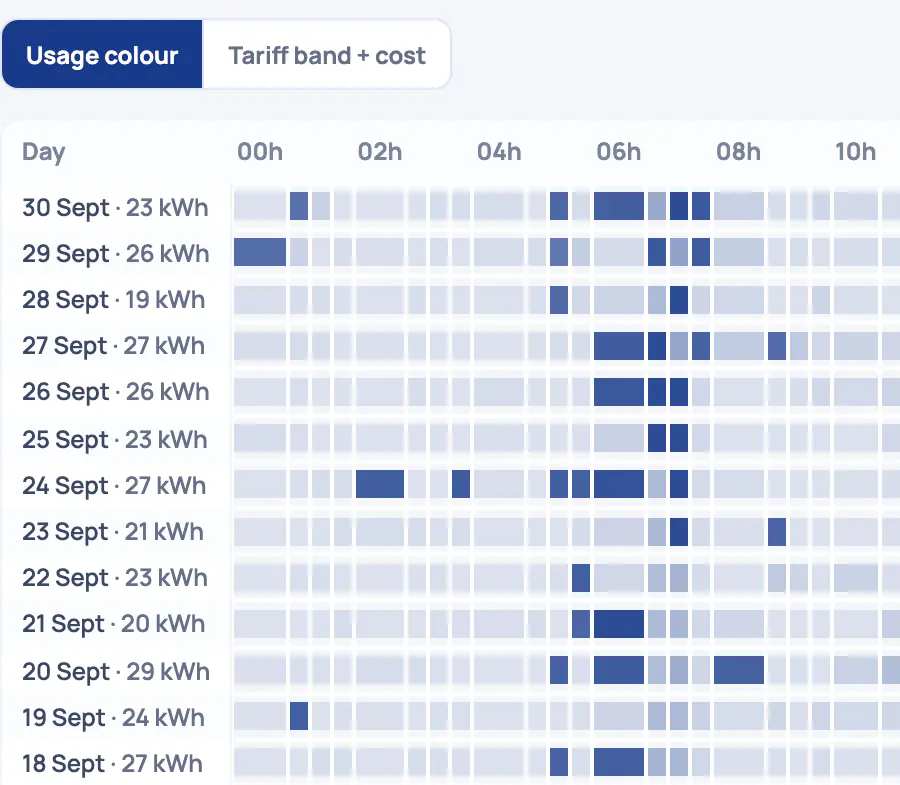
Interval data explorer heatmap of unit A‑03's electricity: one row per day from 30 September back to 18 September, 48 half‑hours across, with darker morning and evening peaks (fictional data)
  1. Every day, every half‑hour. Each row is one day and its total, split into 48 half‑hours. On 30 September this meter used 23 kWh.
  2. Peaks you can see. Darker cells used more. This meter peaks around 06:00, and again from about 17:00 to 21:00.
  3. Six views of the same data. Heatmap, time series, spikes, baseload, events and C&I. The heatmap can also colour each half‑hour by tariff band and cost.
  4. Export or share. Download the half‑hours as CSV or Excel, or copy a link to share.

Maximum demand and power factor

Half‑hourly demand in kW and kVA, peaks against your notified maximum demand, and the power factor, per meter.

Gaps stay gaps

A meter that didn't report shows as missing, never as zero. Every reading keeps its source, so you can tell measured from derived.

Show all4 more capabilities and where it stopsShow fewer

Your data goes with you

Download any range of half‑hours, or a statement, as CSV or Excel. The files are safe to open in a spreadsheet.

Six views of the same data

  • HeatmapEvery day by half‑hour, coloured by use, or by tariff band and cost.
  • Time seriesAny range, against the last period, last year or the meter's usual pattern.
  • SpikesUnusual half‑hours against the meter's own pattern, with a likely cause such as a geyser or a pump starting.
  • BaseloadThe always-on draw in watts, or the minimum night flow for water.
  • EventsAlerts, outages, tariff changes, moves and control commands on one timeline.
  • C&IDemand against your notified maximum demand, power factor and the load-duration curve.
Real Utilitize screen · fictional data
Interval data explorer, C&I tab, for a business park's common-area meter over the last 7 days: a load duration curve with a 5,22 kW peak, a 1,95 kW average and a 37% load factor, and 30‑minute demand under a 6 kVA notified maximum demand (fictional data)
  1. Peak, average and load factor. Over these 7 days: a 5,22 kW peak and a 1,95 kW average, so a 37% load factor. Higher means steadier use.
  2. Every half‑hour, highest first. The load duration curve sorts each half‑hour's demand against the share of time at or above it. Flatter means a better-used supply.
  3. Peaks against your notified maximum. Type in the notified maximum demand from your supply agreement and it's drawn across the chart. Here, 6 kVA.
  4. kVA only where it's measured. This meter reports no apparent power, so the screen says kVA isn't available instead of estimating it.

Found in the half‑hours: the geyser

Heating blocks in a home's 30‑minute readings point to its geyser: when it heats, roughly what share of the electricity it uses, and a timer that fits.

Ready for pilots

An estimate, not a measurement.

Real Utilitize screen · fictional data
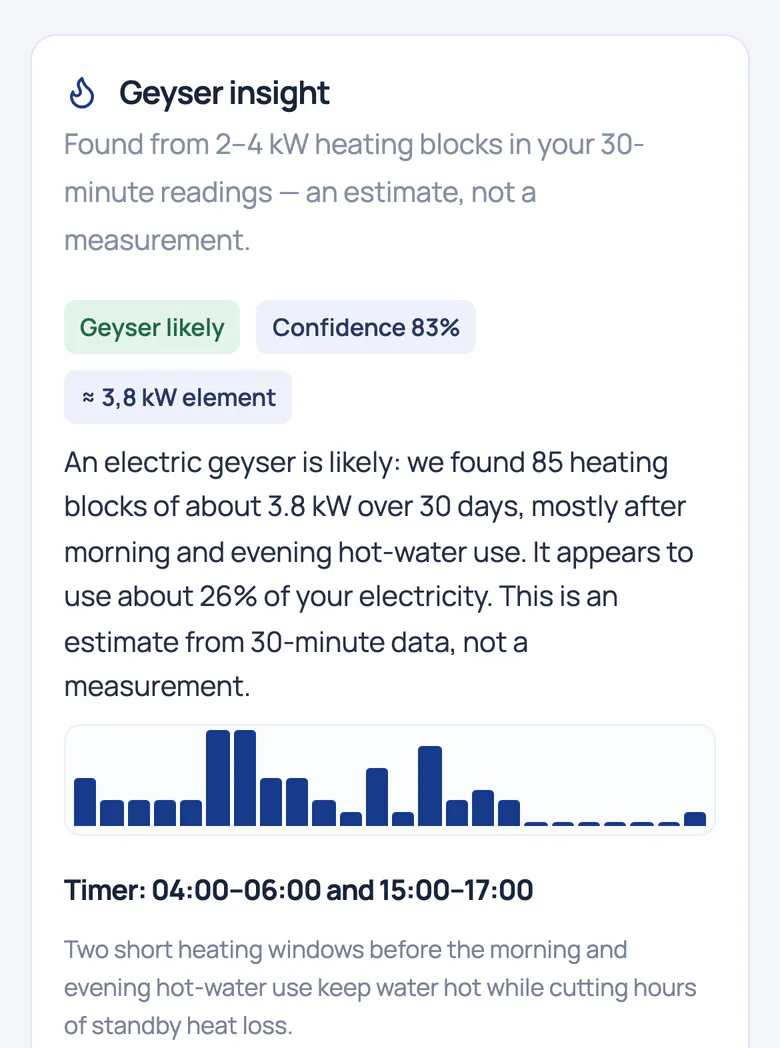
Geyser insight on a phone: geyser likely, 83% confidence, using about 26% of the home's electricity, with an hour-of-day chart and a suggested timer of 04:00 to 06:00 and 15:00 to 17:00 (fictional data)
  1. Found in the half‑hours. Heating blocks in the 30‑minute readings point to a geyser: likely, with 83% confidence.
  2. An estimate, not a measurement. It appears to use about 26% of this home's electricity, from 85 heating blocks over 30 days.
  3. A timer that fits. The hour chart shows when it heats. Suggested timer: 04:00 to 06:00 and 15:00 to 17:00.

Ask Utilitize, the AI assistant

Ask why last month cost more. It answers from your own readings and bills, shows where each answer came from, and says so when it doesn't know.

Where this month's bill is heading

A forecast with a range, explained line by line, from the home's own half‑hours.

Status
Ready for pilots

On smart meters.

Where it stops
Only smart meters report half‑hours, so keypad meters can't join this view.

See everything

Solar: import, export and shared roofs

Solar is metered as its own thing. Import, export and self-use stay apart on every meter, and export is never assumed to be a credit. Ready for pilots

Shared solar, split by your owners' rule

Split rooftop solar between units every half‑hour. Missing data holds solar back instead of favouring anyone, and a finalised month can't change.

Export-drop alerts

A warning when solar export drops well below its recent average, and a flag on export from a meter with no solar registered.

Show all2 more capabilities and where it stopsShow fewer

Inverter data from one inverter make's cloud

Solar, grid and battery figures, read with each owner's own access. It reads, never writes.
Real Utilitize screen · fictional data
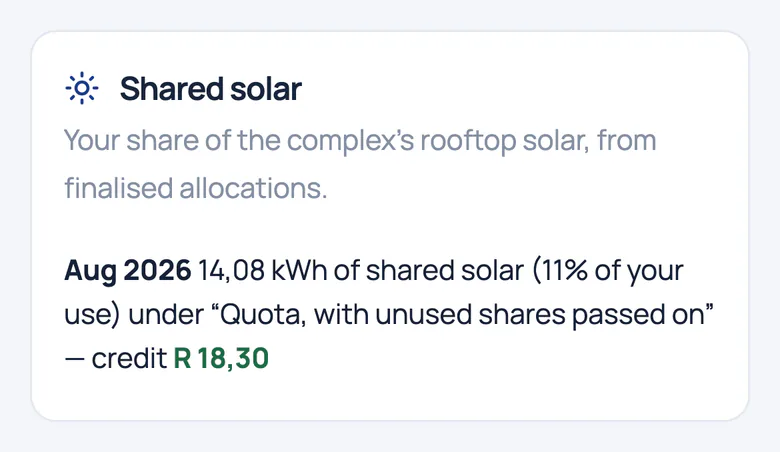
Shared solar on a resident's phone: in August 2026 this home received 14,08 kWh of the complex's rooftop solar, split under the rule quota, with unused shares passed on, and credited at the scheme's price (fictional data)
  1. Your share of the roof. Each finalised month shows this home's share of the complex's rooftop solar: 14,08 kWh in August 2026.
  2. A month that can't change. Shares come from allocations a trustee has finalised, so a month's split can't change afterwards.
  3. Credited under the owners' rule. The share is credited at the scheme's transfer price, split under the rule the owners chose: quota, with unused shares passed on.

One roof, four ways to split it

  • Participation quota
  • In proportion to use
  • Equal shares
  • Quota, with unused shares passed on

Your owners choose the rule. The same month can be compared under every rule before it's finalised.

There's no import and export screen on this page yet. We'll show them on a live walkthrough.

Solar sharing for complexes

Other inverters, performance ratio and PPA billing

Tell us about your solar project, and we'll send one message when it's ready.

Status
Ready for pilots
Where it stops
We read meters. A connector for one inverter make's cloud is built but not switched on; other inverters and a performance ratio are in preparation.

Catch problems early

Leaks, losses and silent meters, flagged with the evidence and how sure we are.

Loss, bypass and tamper signals

When energy or water goes missing between the bulk meter and the units, we show where, since when and how sure we are. Then someone checks on site. Ready for pilots
Real Utilitize screen · fictional data
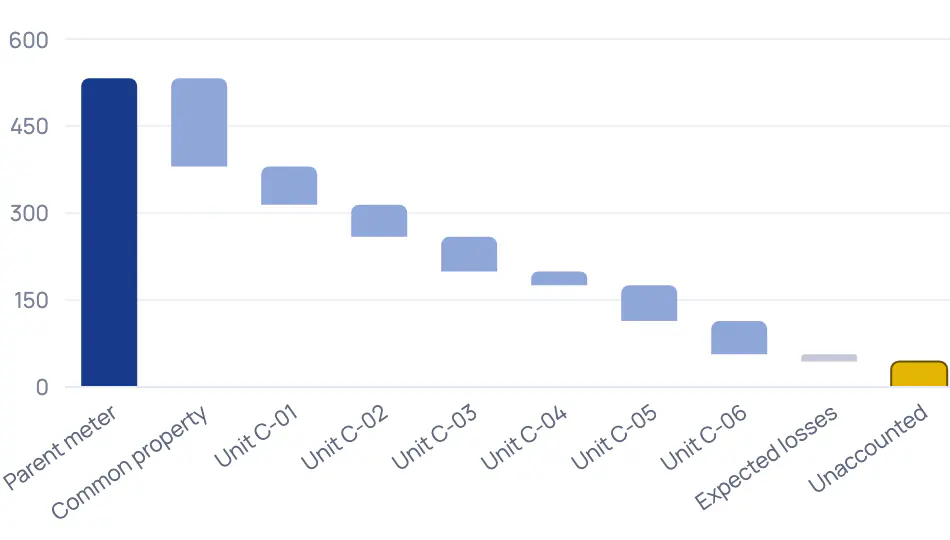
Energy balance for the Silver Oaks Block C bulk meter, flagged as a probable bypass or tamper: a waterfall of where the energy went, unaccounted energy per half‑hour against a learned loss band, and the reasoning behind the finding (fictional data)
  1. Where the energy went. The bulk meter's reading, then common property, units C‑01 to C‑06 and expected losses. The yellow bar is what's left unaccounted.
  2. Checked against a learned band. Each half‑hour's unaccounted energy is compared with the loss band learned from this site's own history.
  3. Why we think this. Plain-language reasoning: unit C‑04 started registering far less than its usual pattern at the same time, which explains most of the extra loss.
  4. Inspection before accusation. The finding stays a probability, with its confidence shown, and asks for a physical inspection before anyone is accused of anything.

Bulk against units, every half‑hour

The bulk meter is compared with the sum of its units and common property, only where every meter has complete data. Each site learns its own normal loss band.

Electrical warning signs

Phase imbalance, a lost phase, a register that stops while current flows, and reverse energy from a reversed CT.

Show all1 more capability and where it stopsShow fewer

Municipal bill reconciliation

Compare the municipal bill with what was recovered from the units, prepaid included: over-recovered, within the expected loss, or a gap to explain.

Status
Ready for pilots

Needs a check meter. Tuned on simulated data.

Where it stops
It shows a probability and its evidence, never a verdict. Nobody is accused before a physical inspection.

Catch problems early

Water: leaks, night flow and bursts

Water flowing all night is flagged after three nights; a burst within hours. Each finding shows the litres lost and how sure we are. Ready for pilots

Real Utilitize screen · fictional data
Two water findings: a possible running cistern at C‑05 (about 8 L/h) and a probable leak at C‑02 (about 30 L/h), each with its reasoning, a night-by-night chart of minimum flow and feedback buttons (fictional data)
  1. Night by night, 02:00 to 04:00. Each bar is one night's minimum flow between 02:00 and 04:00. At C‑02 it never dropped to zero for nine nights.
  2. Losses counted conservatively. Litres lost are a lower bound: minimum night flow times the hours since the first leaking night. Here, about 9 420 L.
  3. Your feedback tunes it. Confirmed on site raises future confidence for this kind of finding at this site; false alarm lowers it.
  4. How sure, in plain sight. Every finding states its confidence. The detectors are tuned on simulated data so far.
Show all2 more capabilities and where it stopsShow fewer

Going away? Holiday mode

Set the dates. The water closes, the geyser switches off, a daily "all quiet" arrives, and everything is restored before you're back.

Built · goes live with tested valves and relays

Needs a smart valve or geyser relay.

Burst shut-off

Where a smart valve is fitted, a burst closes the water and everyone at home is told. One tap reopens it; automation never does.
Real Utilitize screen · fictional data
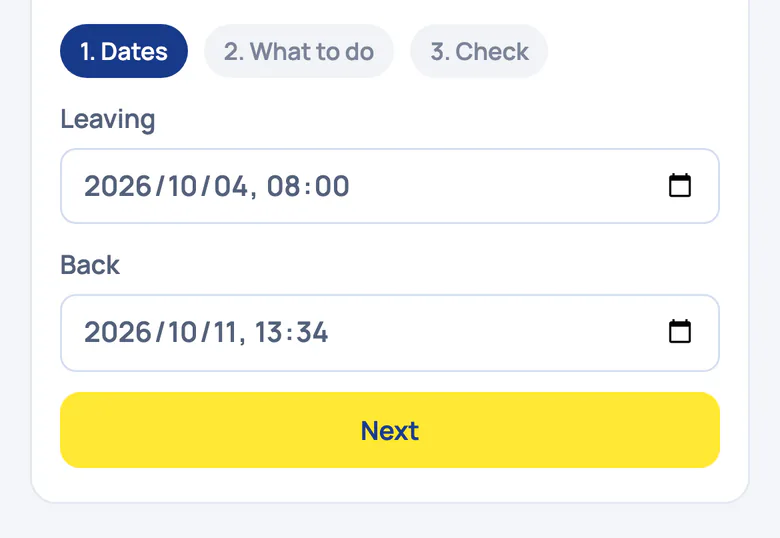
Holiday mode on a phone, step 1 of 3: leaving and return dates and a Next button (fictional data)
  1. Holiday in three steps. Holiday mode is set in three steps: dates, what to do, then a check.
  2. Back before you are. Set when you leave and when you're back. Everything is restored a few hours before you return.
Status
Ready for pilots

Needs smart water meters (30‑minute readings). Tuned on simulated data.

Where it stops
Detection needs smart water meters with 30‑minute readings. Closing the water needs a smart valve; without one, you get the alert.

Catch problems early

Alerts: every signal in one inbox

Bypass findings, unaccounted water, running cisterns, leaks, silent meters and low credit arrive in one list, each linked to its meter and its evidence. Ready for pilots
Real Utilitize screen · fictional data
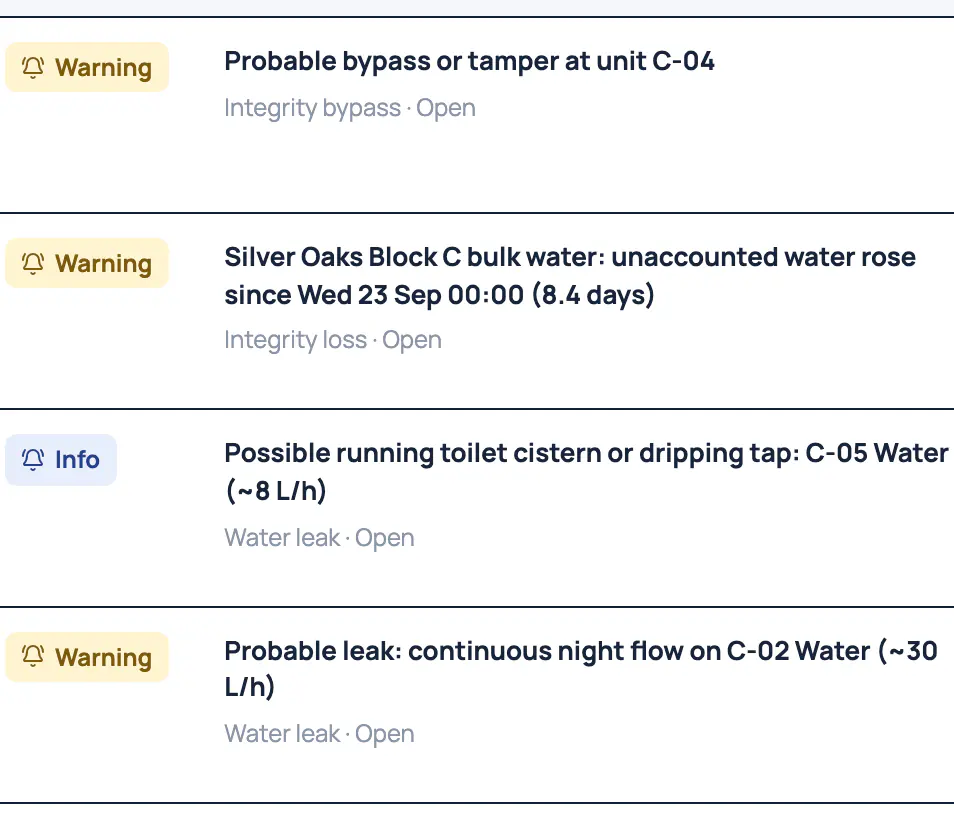
Alerts list for Silver Oaks Block C: a probable bypass at C‑04, unaccounted bulk water, a possible running cistern at C‑05 and a probable leak at C‑02, each with Acknowledge and Resolve (fictional data)
  1. Severity at a glance. Each alert is marked info, warning or critical, so you can see what to look at first.
  2. Different checks, one inbox. A probable bypass, unaccounted bulk water, a running cistern and a night-flow leak arrive in the same list.
  3. Linked to the meter. Every alert links to its meter and site, so the evidence is one click away.
  4. Acknowledge or resolve. Acknowledge an alert or resolve it. Each row shows when it was raised: 26 September 2026, 17:37.

Silent meter or power cut?

A silent meter isn't called a power cut. When meters go quiet, we work out the likely cause: a meter's comms, a gateway, an outage or load-shedding.

From alert to work order

Raise a work order for a meter fault, a leak or a suspected bypass. Its priority sets the due time, and overdue work is flagged.

Show all2 more capabilities and where it stopsShow fewer

Alerts and statements by email and SMS

Choose channels per topic, set quiet hours and take a daily digest. Critical alerts go straight through.

Report a problem, and follow it

Residents raise a problem with their home or a meter, mark it urgent and follow the replies. It never books a call-out by itself.

Status
Ready for pilots

We set up the rules with you.

Where it stops
Alerts reach the app today. Email, SMS and WhatsApp go live with their providers.

Control what matters

Switch, schedule and shut off, and the meter confirms it worked.

Valves, relays and automations

A command counts as done only when the meter confirms it. One switch stops every automation. Built · goes live with tested valves and relays
Real Utilitize screen · fictional data
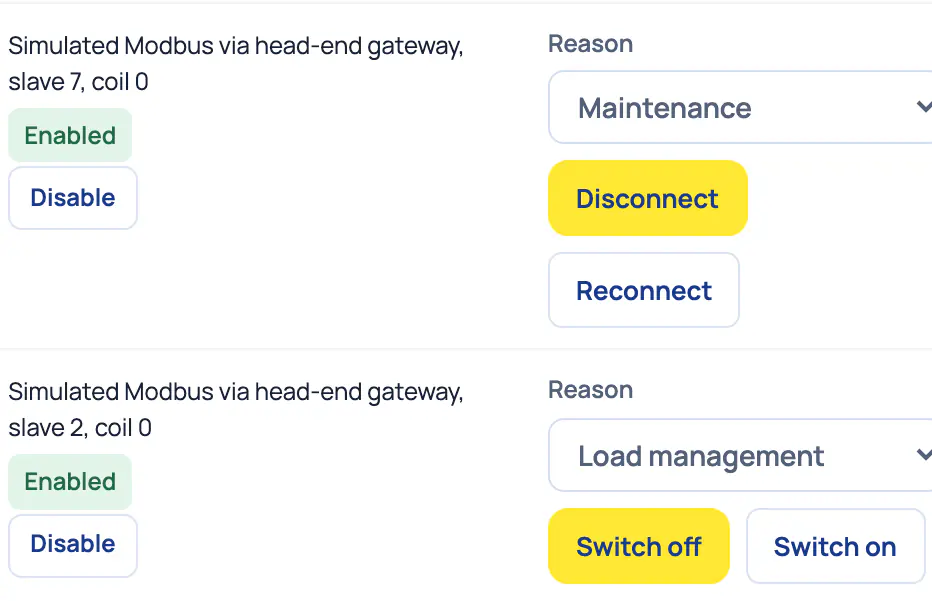
Controls console: an automation kill switch above a devices table, where each supply, geyser and water valve shows its confirmed state, how it's controlled and its switch buttons (fictional data)
  1. One switch stops automation. Stops every automated action and prepaid disconnection at once. Turning it back on needs a fresh confirmation.
  2. Confirmed, not assumed. The state column shows what the device reports back, not what was asked for. A‑02 Supply reads Connected.
  3. Real hardware starts disabled. A‑01 is real hardware. It stays disabled until a manager enables it, with a fresh confirmation.
  4. Switch with a reason. Disconnect a supply, switch a geyser or close a water valve, each with a reason. These devices are simulated.

Safety, built in

One switch stops everything

The kill switch stops every automated action and prepaid switch-off at once. Turning it back on needs a fresh confirmation.

Essential supply

If someone at home depends on electricity for medical equipment, the household can flag it, and the supply can't be switched off remotely.

Show all5 more capabilities and where it stopsShow fewer

No arrears switch-off

There's no arrears switch-off in Utilitize. A maintenance switch-off needs a fresh identity check, tells the tenant and is logged.

How a command counts as done

  1. 1You switch, or a schedule does it for you.
  2. 2The command goes to the valve or relay.
  3. 3The meter reports what actually happened.
  4. 4Only then does the screen say it's done.

If the flow or the power says otherwise, the command is marked failed. That catches a valve that still lets water through, or a relay that's stuck on.

Geyser schedules

Heat in two short windows before hot water is needed, applied in one tap from the geyser insight.

Built · goes live with tested relays

Needs a geyser relay.

Burst shut-off and holiday mode are in Water
Real Utilitize screen · fictional data
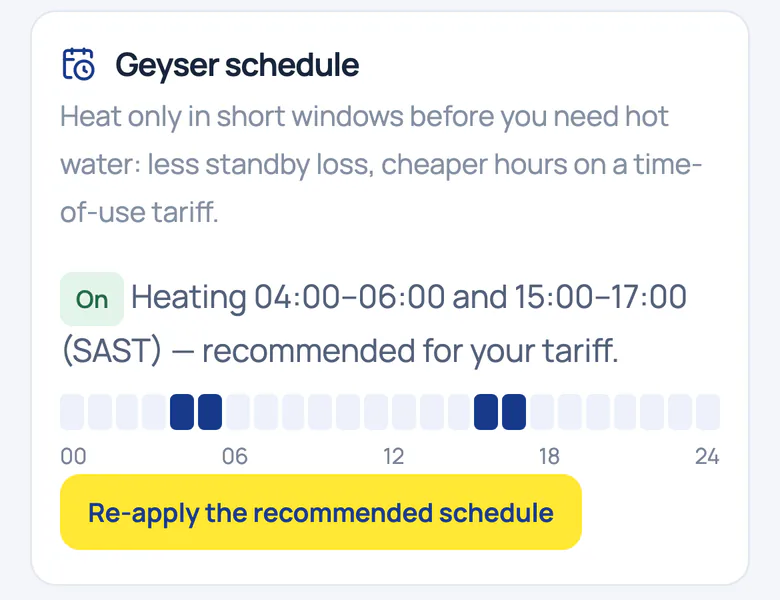
Geyser schedule on a phone: on, heating 04:00 to 06:00 and 15:00 to 17:00, a 24‑hour strip and a button to re-apply the recommended schedule (fictional data)
  1. Heat before you need it. Heats in two short windows, 04:00 to 06:00 and 15:00 to 17:00, recommended for this tariff.
  2. One tap to re-apply. Re-apply the recommended schedule after any change. Needs a geyser relay; tested on simulated devices so far.

Automations you can test on last month's data first

Load-shedding pre-heat

Heats the geyser before a load-shedding slot, then staggers restarts so the supply isn't hit all at once.

Solar diverter

When solar export stays high, opted-in loads such as a geyser or a pool pump switch on one by one. Test it on last month's data first.

Demand limiter

Watches demand against your notified maximum demand, sheds the loads you rank last and restores them in turn. Test it on last month's data first.

Status
Built · goes live with tested valves and relays

Needs a smart valve or relay.

Where it stops
Tested on simulated devices so far. Real hardware starts disabled until a manager enables it, with a fresh confirmation.

Bill and collect

Statements from actual readings, prepaid without tokens and a proof on every bill.

Billing, month-end and bills anyone can check

Utility billing software that runs the month-end; you approve the exceptions. Statements use actual readings, and an incomplete statement is held back, never sent quietly. Ready for pilots

Real Utilitize screen · fictional data
Operations autopilot control tower: 4 open exceptions, 1 work order open and overdue, 9 cycles needing you and 0 statements pending, with the first five cycles that need a decision listed below (fictional data)
  1. Exceptions come first. Validation raises exceptions such as missing readings or no tariff. Four are open and need a person.
  2. Overdue work, flagged. Work orders carry deadlines. One is open, and it's already overdue.
  3. Issuing waits for a decision. Issuing waits while a warning or critical exception is open. The other cycles wait for review and approval.
  4. The steps run themselves. Onboarding, the monthly billing cycle and work orders run as steps. The control tower shows what needs a person.
Show all6 more capabilities and where it stopsShow fewer

Bills anyone can check

Every bill carries a QR code. Scan it, and your own phone checks that the readings behind it haven't changed since they were recorded.

Ready for pilots

How a bill check works

  1. 1Each reading is fingerprinted when it arrives.
  2. 2The fingerprint joins a public, append-only log.
  3. 3Every bill carries a QR code.
  4. 4Your phone recomputes the fingerprints and checks the log.

It proves the readings haven't changed since they were recorded. It doesn't test the meter itself.

The bill check in the iPhone app

The bill, checked on the phone

Real Utilitize screen · fictional data · iPhone app, not yet in the App Store
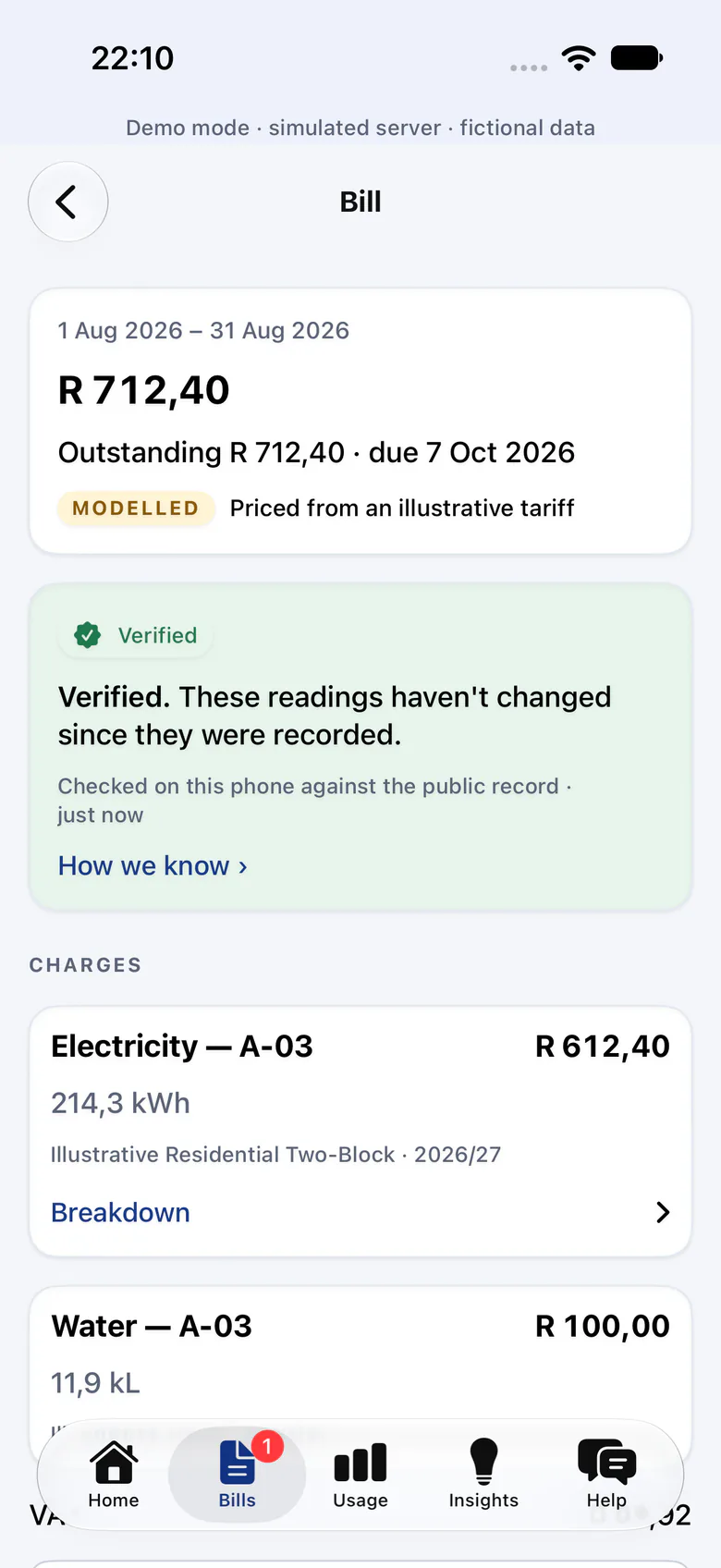
iPhone app bill for August 2026, priced from an illustrative tariff, with a Verified badge: these readings haven't changed since they were recorded, checked on this phone against the public record (fictional data)
Built · goes live with app-store listings
  1. Checked on this phone. The app checked this bill's readings against the public record: they haven't changed since they were recorded.
  2. See how we know. Tap through for the proof: every reading is fingerprinted when it arrives and added to an append-only log.
  3. Honest labels on demo data. This demo bill is marked Modelled: priced from an illustrative tariff, not a municipal schedule.

The proof behind the badge

Real Utilitize screen · fictional data · iPhone app, not yet in the App Store
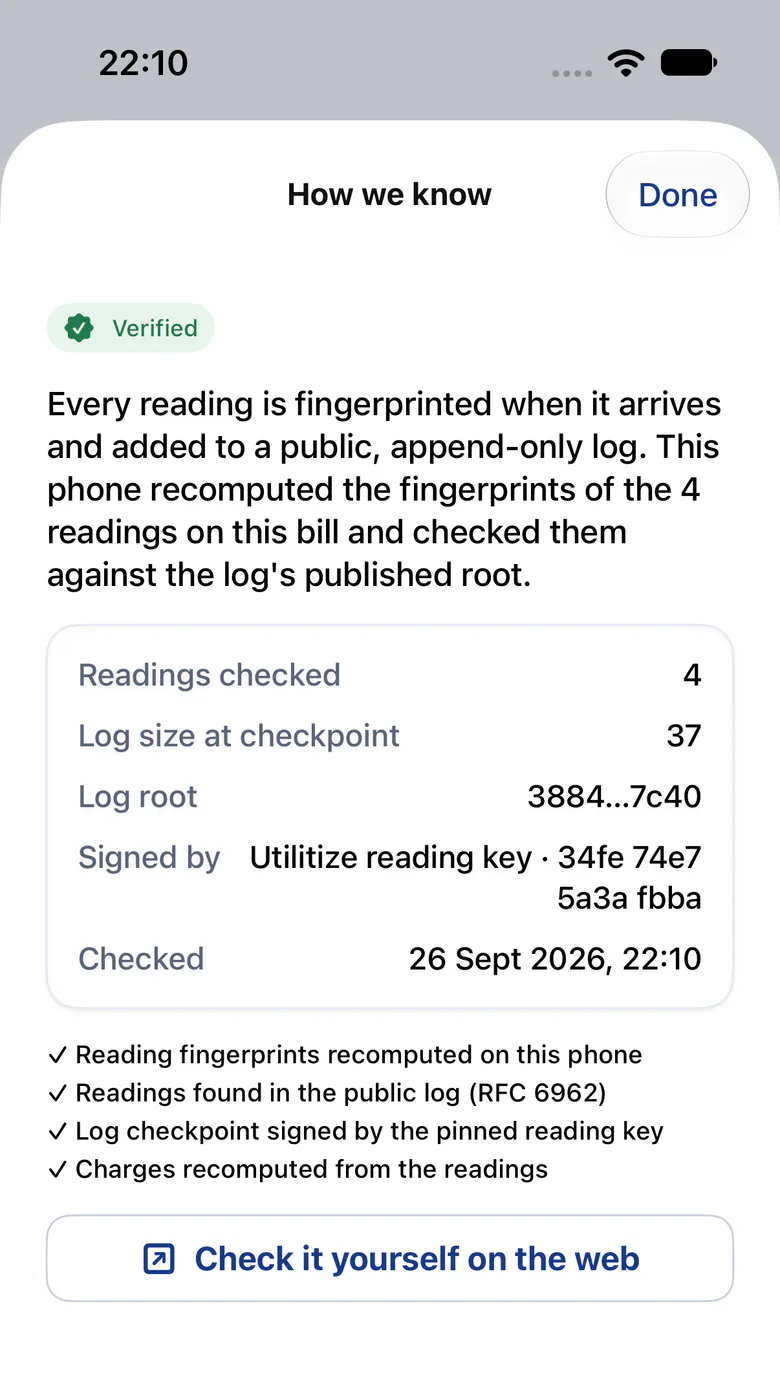
iPhone app, How we know: the phone recomputed the fingerprints of the bill's 4 readings and checked them against a public, append-only log, with a button to check it yourself on the web (fictional data)
Built · goes live with app-store listings
  1. Fingerprinted on arrival. Every reading is fingerprinted when it arrives and added to a public, append-only log.
  2. Recomputed on the phone. The phone recomputes the fingerprints and the charges itself, and checks the log checkpoint's signature.
  3. Check it in a browser. The same check runs on the web, so anyone with the bill can repeat it.

Statements from actual readings

Usage times the tariff, per meter and period, with a cost only where a tariff applies. Each statement shows the readings and the next reading date.

Polite reminders

Reminders at 7, 21 and 35 days, tested never to mention disconnection.

A dispute pack for the CSOS

A print-ready pack for the Community Schemes Ombud Service, per meter and period: the readings with their proofs, the invoices and the tariff versions applied.

Onboarding from spreadsheets

Onboard a complex from six spreadsheets, with a dry run, an all-or-nothing apply and a real undo.

Commercial recovery billing with lease rules

Lease rules, shared areas and demand charges, recovered from commercial tenants. Tell us what you need to recover.

Status
Ready for pilots

Statements reach residents in the app until email and SMS switch on.

Where it stops
Tariffs are illustrative until each site's municipal tariffs are loaded. We don't bill levies; we feed your levy software by CSV.

Bill and collect

Prepaid without tokens

On smart meters there's no token to type. Tenants top up in two taps, and the meter confirms the power is on. Built · goes live with payments

Prepaid screens

1. The balance, in rand and days

Real Utilitize screen · fictional data
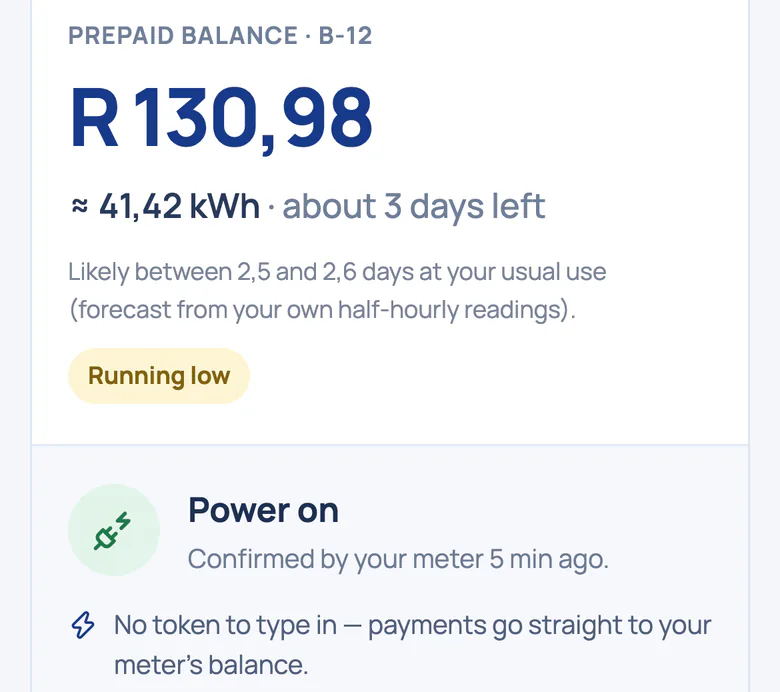
Prepaid balance for unit B‑12 on a phone, in rand and about 41,42 kWh with about 3 days left, marked running low, and power on, confirmed by the meter 5 minutes ago (fictional data)
Built · goes live with payments
  1. Balance in rand and days. The balance in rand and roughly in kWh, with about 3 days left at this home's usual use, so it's marked running low.
  2. Confirmed by the meter. Power on, confirmed by the meter itself 5 minutes ago. There's no 20-digit token to type in.

2. Two taps, no token

Real Utilitize screen · fictional data
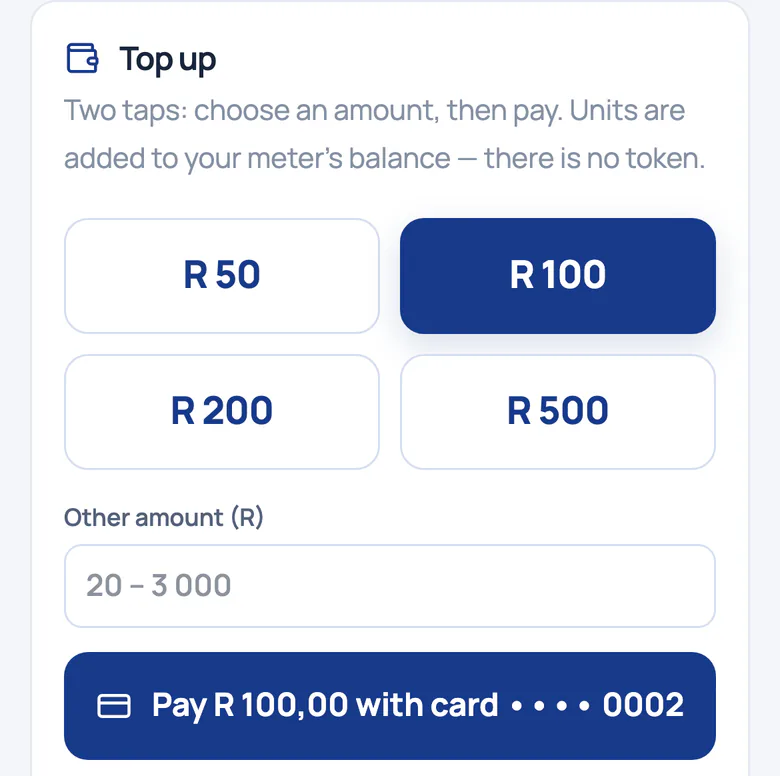
Top-up card on a phone: four preset amounts, a box for another amount, and a button to pay with a saved card (fictional data)
Built · goes live with payments
  1. Two taps, no token. Choose an amount, then pay. Units are added to the meter's balance; there's no token.
  2. Preset or your own amount. Pick a preset or type another amount, then pay with a saved card. Payments run on a sandbox for now.

3. Power on, confirmed by the meter

Real Utilitize screen · fictional data · iPhone app, not yet in the App Store
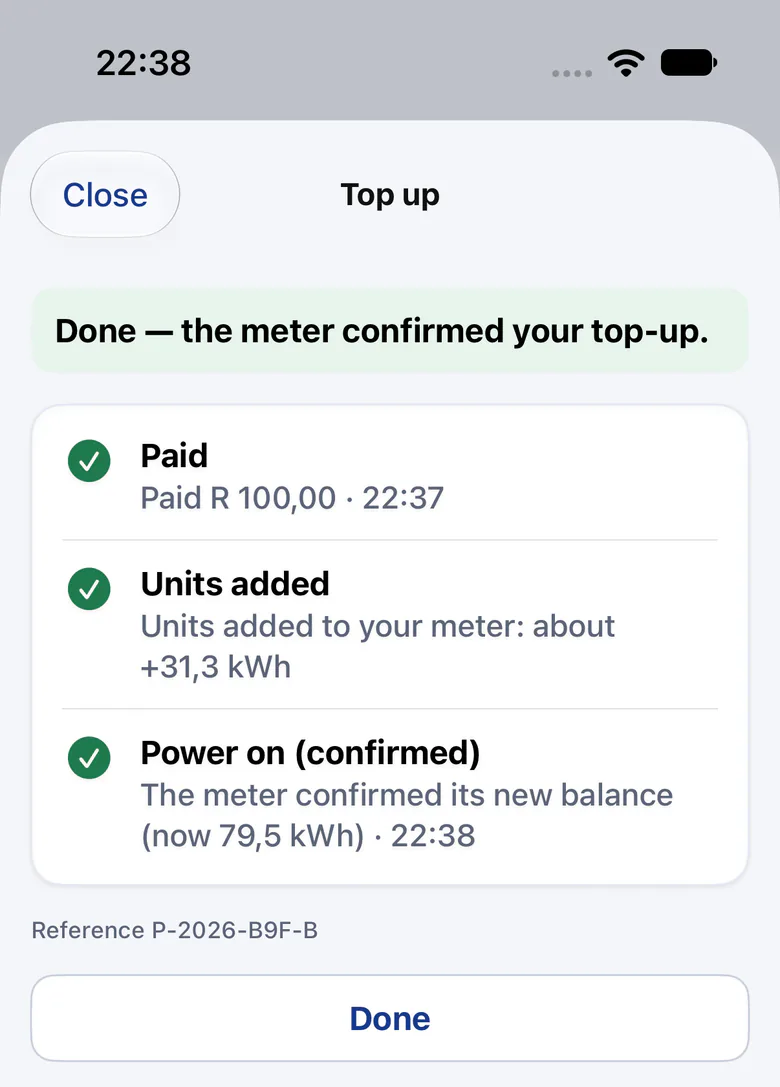
iPhone app top-up done: paid, units added, and power on, confirmed when the meter reported its new balance (fictional data)
Built · goes live with app-store listings
  1. Paid, then added. The payment, then the units added to the meter: about 31,3 kWh in this capture.
  2. Power on, confirmed. The last tick appears only when the meter confirms its new balance, here 79,5 kWh.

Or on WhatsApp

Real Utilitize screen · fictional data
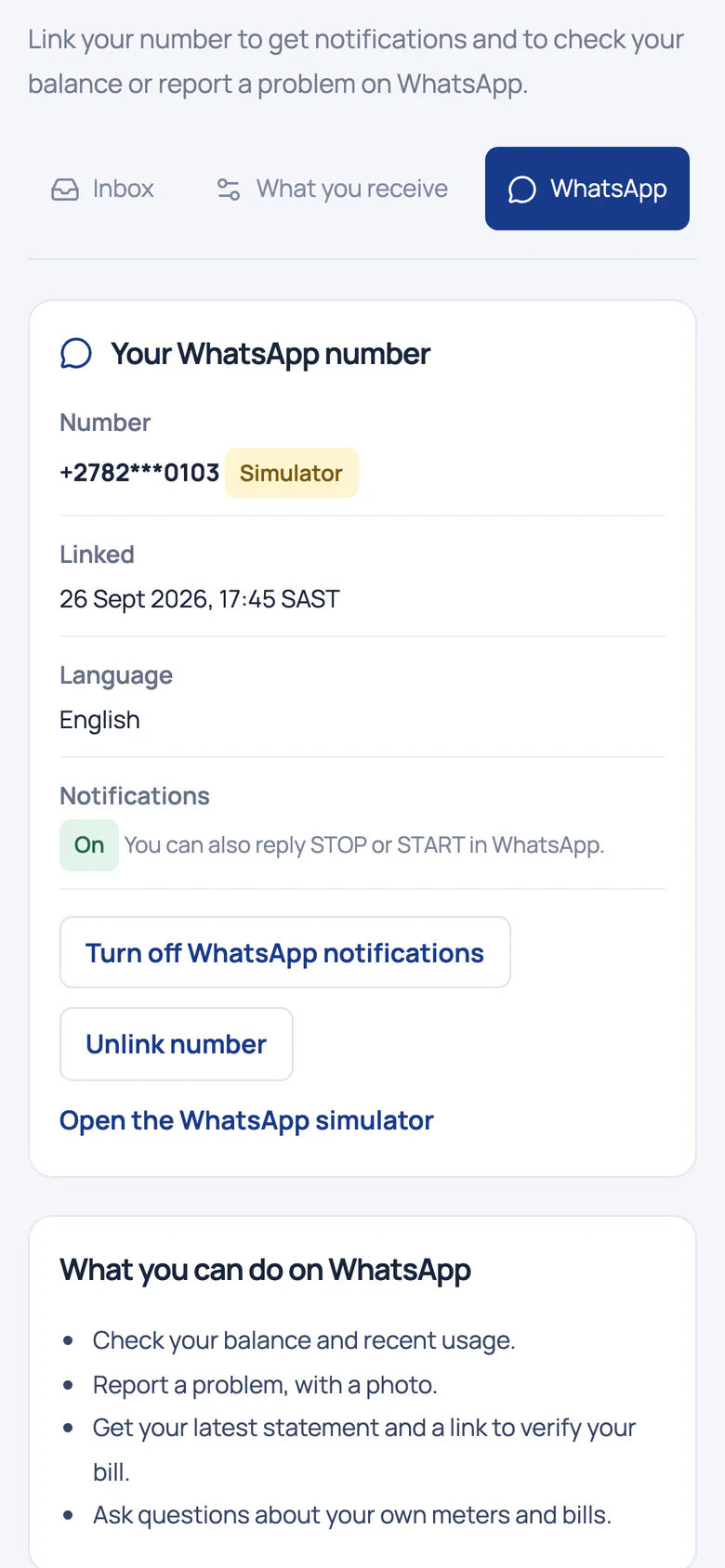
WhatsApp settings on a phone: a masked number tagged Simulator, notifications on, and a list of what you can do on WhatsApp (fictional data)
Built · goes live with our WhatsApp number

Understands English, Afrikaans and isiZulu; replies in English.

  1. Marked as a simulator. A masked number, tagged Simulator: WhatsApp runs on our simulator until our WhatsApp number goes live.
  2. Alerts you can stop. Notifications arrive on WhatsApp; reply STOP or START to turn them off or on.
  3. More than notifications. Check your balance and usage, report a problem with a photo, get your statement and a link to verify your bill.

Emergency and friendly credit

Credit that tides a tenant over when the balance runs out, repaid from later top-ups with no fee or interest.

Auto top-up

Top up automatically below a balance you choose, or once a month, with a monthly cap. Cancel any time.

Show all2 more capabilities and where it stopsShow fewer

Days of credit left

Worked out from the home's own half‑hours, with a likely range. A forecast, not a promise.

Prepaid money, for owners

Collected from top-ups, electricity used, the payment fees the owner pays and what's payable to the owner this month.

Status
Built · goes live with payments
Where it stops
Payments run in a sandbox until they go live. Tokenless prepaid needs smart meters that can be switched remotely.
Fees and rates
Utilitize charges tenants no fees, and we don't take a percentage of anyone's electricity or water.
Prepaid electricity is priced at the municipal energy rate. Demo tariffs are illustrative; each site's municipal tariffs are loaded before it goes live.

Bill and collect

Keypad prepaid meters

We're working on options for keypad sites. Tell us about your meters. In preparation

Show allwhat to tell us, and where it stopsShow fewer

Tell us about your keypad meters

  • How many you have
  • Their brand
  • Your token vendor
  • Who holds the supply group code

We'll send one message when there's news. No dates until we commit to one.

Status
In preparation
Where it stops
Keypad meters work one way: a token goes in, and nothing comes back. So they can't report half‑hours, take a top-up sent from a phone or switch off remotely.

Bill and collect

Tenants: moving in and out, and access

End a tenancy from a set date and add the next tenant with an invite. History is kept, and a new tenant never sees the previous tenant's data. Ready for pilots

Real Utilitize screen · fictional data
Unit M‑03's tenancy: Lindiwe Zulu's lease with an end date of 2026/10/03 being set, the note that history is kept, and the Add a tenant form below (fictional data)
  1. Move-out on a set date. End a lease from a chosen date. Once confirmed, the resident loses access from that day.
  2. History is kept. Ending a tenancy doesn't delete it. Every unit keeps its full tenancy history.
  3. Move-in with an invite. Adding a tenant creates the occupancy and an invite link to pass on; the tenant sets their own password.

Move-out, settled

An actual final reading before the closing invoice, the deposit on an itemised statement, and a prepaid balance back to the leaving tenant's wallet.

A clean start for every tenant

A new tenant sees nothing from before their move-in date: no readings, no bills and no alerts.

Show all2 more capabilities and where it stopsShow fewer

Roles, "view as" and an audit log

Give people a role with an end date. "View as" shows a permanent banner, and the audit log records both people and shows tampering.

A scheme changes hands

When a site is sold, or a new managing agent takes over, it moves to the new customer account.

Status
Ready for pilots
Where it stops
The guided move screen is coming. Today we run final readings and the deposit statement with you, then you add the next tenant. Until email switches on, you pass the invite link on yourself.

The foundation

Everyone's welcome

One flat or a whole portfolio. Bring the meters you have, and keep everyone's data safe. Your own devices: in preparation.

Meters we read: smart, smart prepaid and bulk

Bring the meters you have. We'll tell you honestly what we can read. Built · goes live with tested meters

Drivers we've built

  • Modbus (CHINT, Eastron)
  • DLMS without encryption
  • IEC 62056‑21 optical
  • Wireless M‑Bus
  • LoRaWAN

Not sure what you have? Email a photo of one meter.

Email a photo of one meter

Read at a test site

We read real smart meters at a test site, read-only, through a provider's network.

Our own gateway

For meters off a provider's network, a 4G gateway dials in and we read the meters on its bus ourselves.

Show all1 more capability and where it stopsShow fewer

Installers on the web

Register, install and bind meters, then see the first reading arrive before leaving site.
How readings reach your dashboard

  1. 1Your meter takes its readings.
  2. 2A provider's network, or our own gateway, collects them.
  3. 3We check each one: duplicates are ignored and conflicting values are held back.
  4. 4Your dashboards fill in, half‑hour by half‑hour.
Real Utilitize screen · fictional data
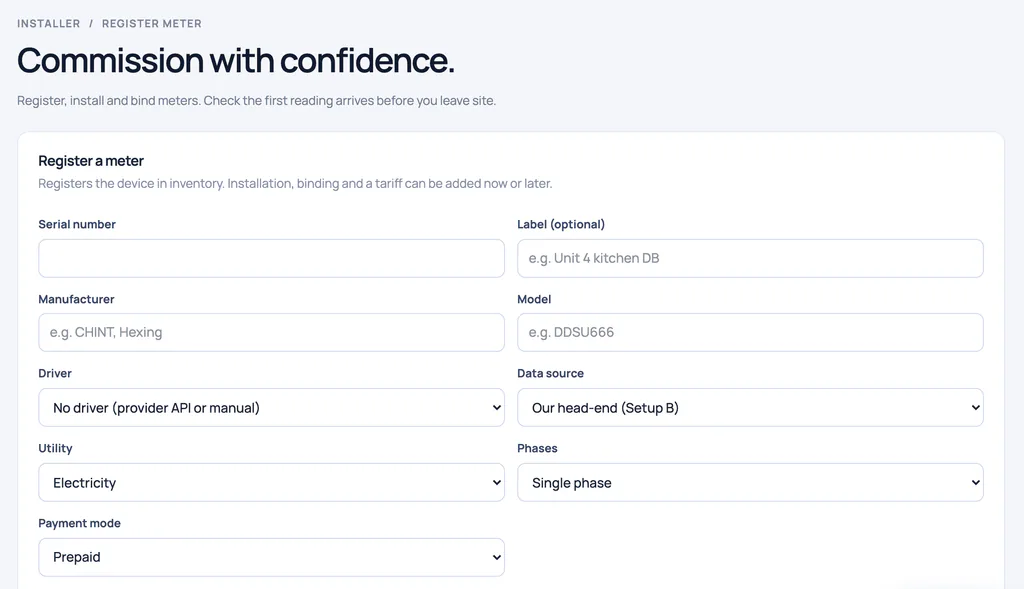
Installer workspace, Commission with confidence: the Register a meter form with serial number, label, manufacturer, model, driver, data source, utility, phases and payment mode (fictional data)
  1. First reading before leaving. Register, install and bind meters, then check the first reading arrives before you leave site.
  2. Where readings come from. Pick the data source: our own head-end, a provider connection, manual readings or a simulator.
  3. Meter details up front. Utility, phases and payment mode are set when the meter is registered; installation and a tariff can follow.
Status
Built · goes live with tested meters

Tested on simulators; we confirm each model on your site first.

Where it stops
So far we've read real smart meters at one test site, read-only. Every other driver has been tested on simulators.

Everyone's welcome

Integrations and your own devices

Connect your own Wi-Fi relays and smart plugs, and use an API for your data and load forecasts: in preparation. Tell us what you'd connect. In preparation

Show allwhat you could connect, and where it stopsShow fewer

What would you connect?

  • Wi-Fi relays and smart plugs
  • Home-automation systems
  • Building-management systems
  • Property and levy software
Status
In preparation
Where it stops
There's no public API yet. Today your data leaves as CSV and Excel exports, and levy software takes a CSV.

Everyone's welcome

Security and privacy

Residents can't see each other's accounts, and each client's data is walled off from the next. People act on their POPIA rights in the privacy centre: see their consents, download their data and ask for erasure. Ready for pilots

Built to encrypt per organisation

Built to encrypt personal details per organisation. Erasing a person destroys their key.

Passkeys and step-up checks

Passkeys, authenticator codes and a fresh identity check before money or access changes.

Show all1 more capability and where it stopsShow fewer

Walled off from each other

Managing agents and installers each work in their own space and see only their own data.

Status
Ready for pilots
Where it stops
Planned to run in Google Cloud's Johannesburg region. The platform isn't deployed yet.

Everyone's welcome

On your phone: iPhone and Android apps

One app, three modes. Residents check balances and bills, managers follow alerts and sites, and installers commission meters on site. Built · goes live with app-store listings

iPhone app screens

Residents: balance and forecast

Real Utilitize screen · fictional data · iPhone app, not yet in the App Store
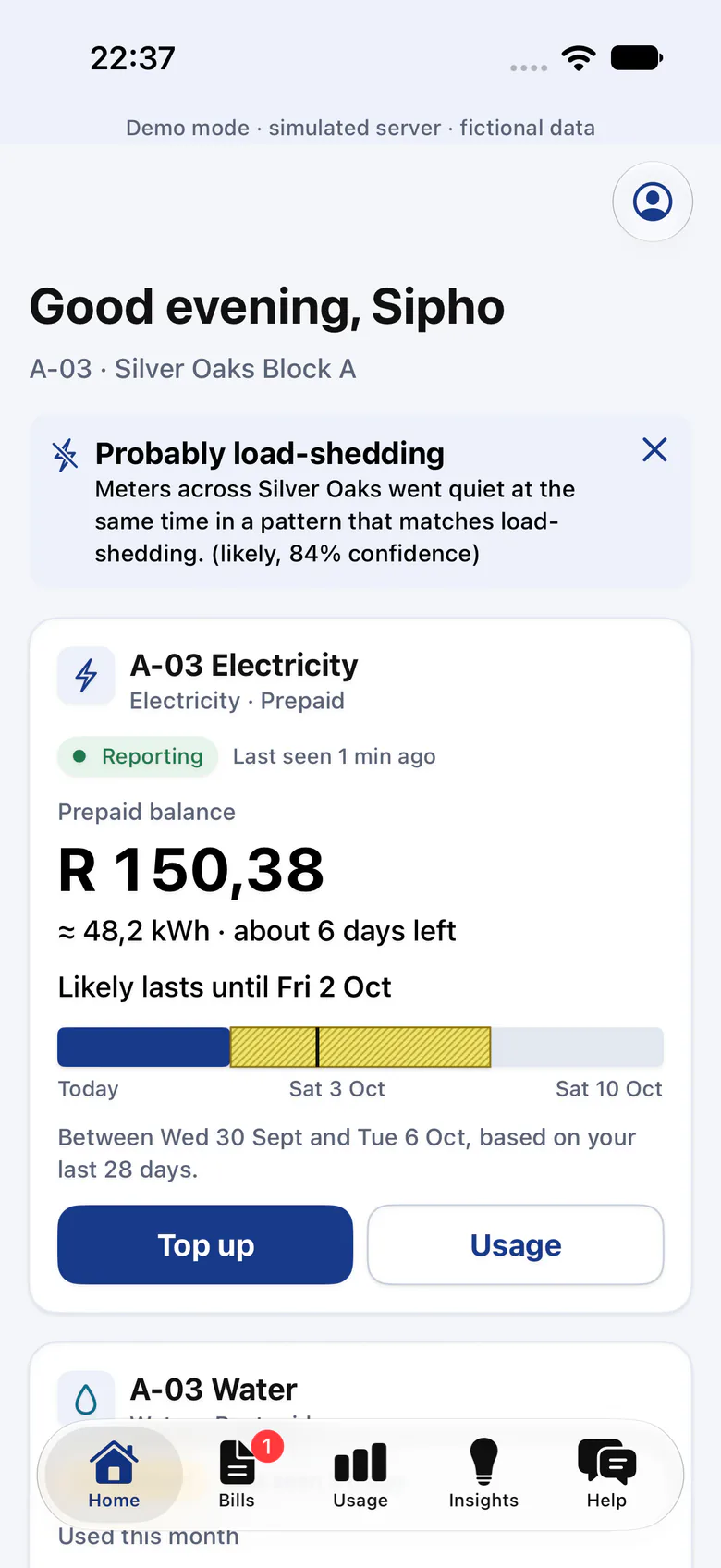
iPhone app home for unit A‑03: a probable load-shedding notice, a prepaid balance with about 6 days left, a forecast range, and Top up and Usage buttons (fictional data)
Built · goes live with app-store listings
  1. Load-shedding, not a fault. When meters across the complex go quiet together, the app says it's probably load-shedding, and how sure it is.
  2. Balance you can read. The balance in rand and roughly in kWh, with about 6 days left at this home's usual use.
  3. A forecast, not a promise. How long the credit should last, as a range worked out from this home's last 28 days.

Residents: no token to type

Real Utilitize screen · fictional data · iPhone app, not yet in the App Store
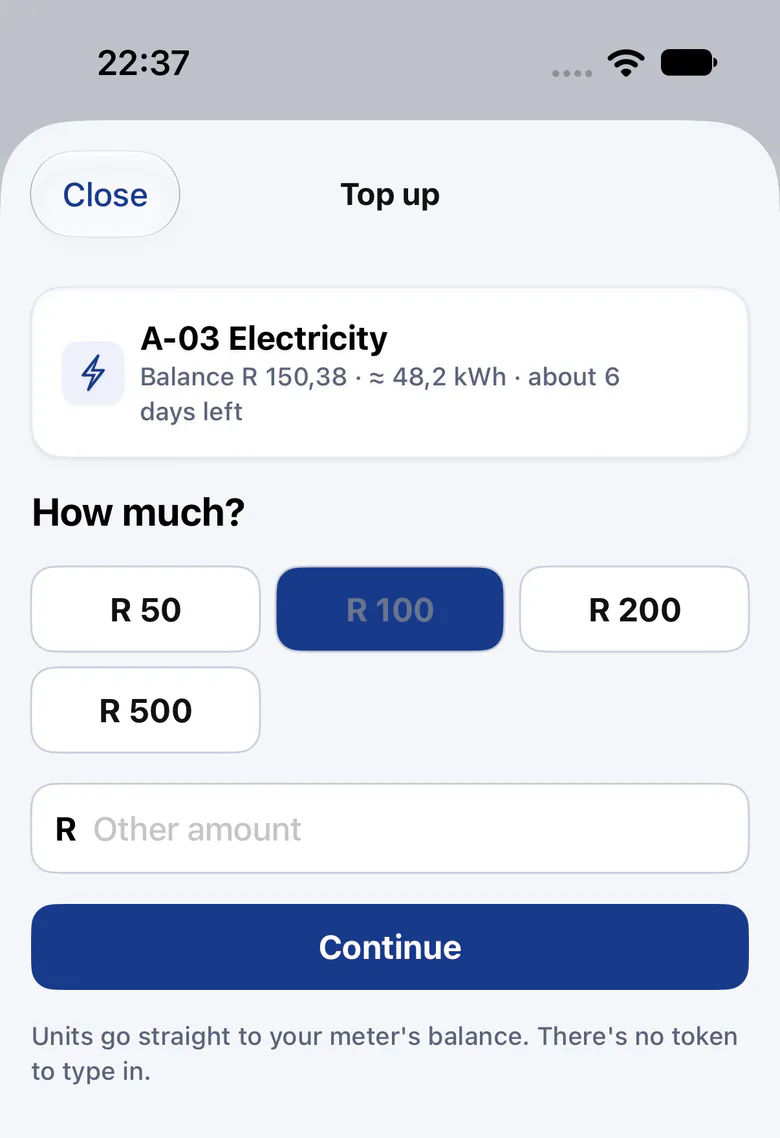
iPhone app top-up: four preset amounts or another amount, a Continue button, and the note that units go straight to the meter's balance with no token to type in (fictional data)
Built · goes live with app-store listings
  1. How much, in one tap. Pick a preset amount or type another, then continue.
  2. No token to type. Units go straight to the meter's balance. There's no token to type in.

Installers: what's left on site

Real Utilitize screen · fictional data · iPhone app, not yet in the App Store
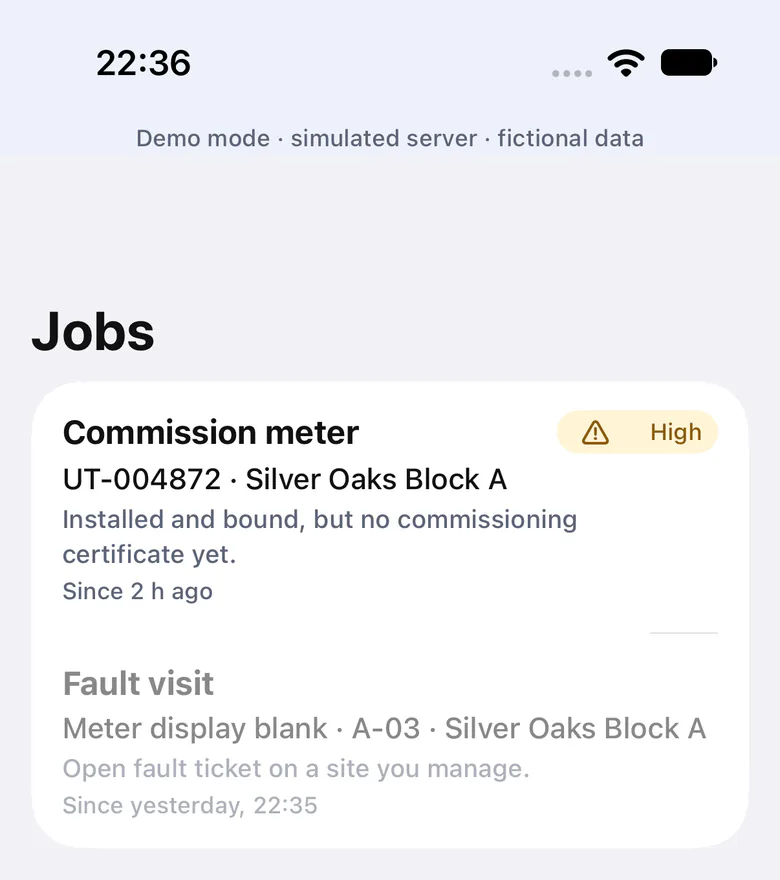
iPhone app installer jobs: commission meter UT‑004872 at Silver Oaks Block A, marked high, and a fault visit for a blank meter display at A‑03 (fictional data)
Built · goes live with app-store listings

Tested against a simulated server so far.

  1. What's left on site. Jobs list what's still to do, such as a meter installed and bound but without its commissioning certificate.
  2. Fault visits too. Open fault tickets on sites you manage appear as jobs, such as a blank meter display at A‑03.

Installers: the first reading, on site
Real Utilitize screen · fictional data · iPhone app, not yet in the App Store
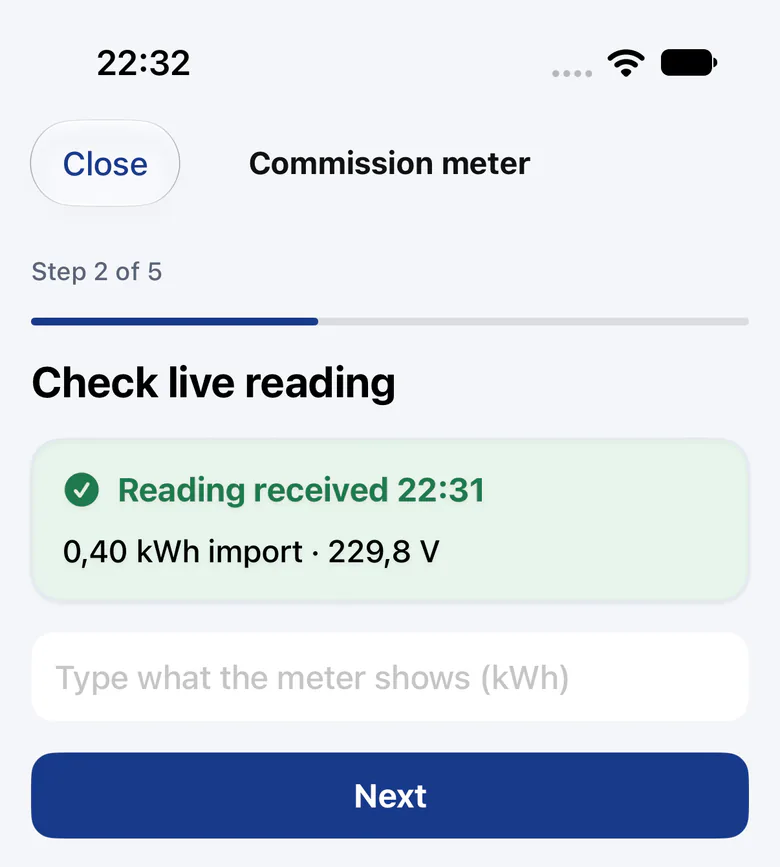
iPhone app commissioning, step 2 of 5: reading received at 22:31, 0,40 kWh import at 229,8 V, and a box to type what the meter shows (fictional data)
Built · goes live with app-store listings

Tested against a simulated server so far.

  1. Five guided steps. Commissioning runs as a five-step wizard on the installer's phone, tested against a simulated server so far.
  2. First reading on site. The first reading arrives while the installer is still there: 0,40 kWh import at 229,8 V.
Show all2 more capabilities and where it stopsShow fewer

Signed commissioning certificates

Scan the meter label, watch the first reading arrive, add GPS and photos, then sign a certificate on the phone.

WhatsApp

Balance, usage, top-ups, a leak report with a photo, and your statement with a link to check it.

Status
Built · goes live with app-store listings
Where it stops
Neither app is in a store yet. The web portal works in any phone's browser.

Every screen in the portal

Twenty-two portal pages and the public bill check, by who uses them. Screens shown on this page link to their section; we'll open the rest with you on a live walkthrough.

Screens captured on fictional data in September 2026: the web portal on 30 September, the iPhone app on 26 September.

Residents and tenants

Show all 3 screens
  • My home

    Each meter at home with its latest reading, this month's use and cost, and how fresh the data is.

    Ready for pilotsOn a live walkthrough
  • Prepaid

    The balance, days left and a two-tap top-up; for owners, the month's prepaid money.

    Built · goes live with paymentsSee it in Prepaid
  • Savings

    Geyser insight, days of credit left, shared solar credit and a rate check against the municipal tariff.

    Ready for pilotsSee it in Usage

Owners, trustees and managers

Show all 10 screens
  • Owner overview

    A landlord's sites, units and meters, today's use with data coverage, money owed and open alerts.

    Ready for pilotsOn a live walkthrough
  • Complex overview

    The whole scheme: units, common-property meters, today's use with coverage, solar this month and alerts.

    Ready for pilotsOn a live walkthrough
  • Site

    Units with this month's electricity and water, common property, solar and reporting groups.

    Ready for pilotsOn a live walkthrough
  • Unit

    Tenancies past and present: end a lease, add a tenant and keep the history.

    Ready for pilotsSee it in Tenants
  • Meter

    Latest values, raw readings with their source, installation history, alerts and tickets.

    Ready for pilotsOn a live walkthrough
  • Explore usage

    Heatmap, time series, spikes, baseload, events and C&I for one meter, a unit, a site or a group.

    Ready for pilotsSee it in Usage
  • Grid & integrity

    Bulk against units, leak and cistern findings, outage and comms events, and the metering topology.

    Ready for pilotsSee it in Losses
  • Alerts

    Every alert with its severity, meter and site, to acknowledge or resolve.

    Ready for pilotsSee it in Alerts
  • Controls & automation

    Valves and relays with their confirmed state, the kill switch and automation rules; residents get home controls.

    Built · goes live with tested valves and relaysSee it in Controls
  • Invoices

    The tariff breakdown, payments, what's outstanding, the bill-check QR code and the dispute pack.

    Ready for pilotsOn a live walkthrough

Managing agents and operators

Show all 5 screens
  • Portfolio overview

    Every scheme's meters, gateways, alerts and billing, with the meters that stopped reporting.

    Ready for pilotsOn a live walkthrough
  • Operations

    The control tower, billing cycles, onboarding from spreadsheets and work orders.

    Ready for pilotsSee it in Billing
  • Users & invites

    Invite people to a role and a scope; access can end on a date or be revoked.

    Ready for pilotsOn a live walkthrough
  • Audit log

    Who changed what and when, including who viewed as whom, in a log that shows tampering.

    Ready for pilotsOn a live walkthrough
  • Admin

    Platform health, organisations and feature switches, for the team that runs the platform.

    Ready for pilotsOn a live walkthrough

Installers

Show the screen
  • Installer workspace

    Register, install, bind and bulk-import meters, then watch for the first reading.

    Ready for pilotsSee it in Meters

Everyone who signs in

Show all 4 screens
  • Notifications

    An inbox, channel choices per topic, quiet hours and WhatsApp linking.

    Built · goes live with email and SMS providersSee it in Prepaid
  • Security

    Passkeys, authenticator codes, your devices and a fresh check before sensitive changes.

    Ready for pilotsOn a live walkthrough
  • Privacy

    See your consents, download your own data and ask for erasure.

    Ready for pilotsOn a live walkthrough
  • Bill check

    A public page: anyone with a bill scans its QR code, and their own browser checks the readings behind it.

    Ready for pilotsSee it in Billing

Honest answers

Is this a demo I can click through?

No. These are real screens from the Utilitize portal, captured on fictional data. We don't publish a clickable copy. We open the real portal with you on a live walkthrough instead.

Where is Utilitize today?

Built and tested. We're choosing our first pilot sites. Every feature on this page carries its status: ready for pilots, built and waiting on a partner, or in preparation.

Do I need new meters?

Not always. Bring the meters you have, and we'll tell you honestly what we can read. Half‑hourly features need smart meters. If you have keypad meters, join the keypad list.

Do tenants pay Utilitize a fee?

No, and we don't take a percentage of anyone's electricity or water. The owner or body corporate pays for Utilitize.

Where will my data be kept?

The platform is planned to run in Google Cloud's Johannesburg region. It's built to encrypt personal details per organisation, and residents can't see each other's accounts.

Updated

See it live. Book a 30-minute walkthrough.

Bring last month's municipal bill or a photo of one meter.