
Bring the meters you have
We'll tell you honestly what we can read.
Body corporates and sectional title
On smart meters, see every unit and the common property every half‑hour. Find where water and power go missing, with the evidence. And put a QR code on every bill, so any owner can check it.
A 30‑minute video call with the founder. Bring last month's municipal bill.
Every unit and the common property, every half‑hour.
Losses, bypass signals and leaks, with the evidence.
Where a smart valve is fitted, a burst closes the water.
Statements from actual readings, with a proof on every bill.
What the labels mean
Built and tested. We're choosing our first pilot sites.See what's built
Catch problems early
The body corporate pays the bulk bill. Whatever a bypassed meter doesn't record, and any leak on common pipes, lands on the scheme. Utilitize compares the check meter on each bulk supply with every unit, every half‑hour, and shows where, since when and how sure we are. Then someone checks on site.
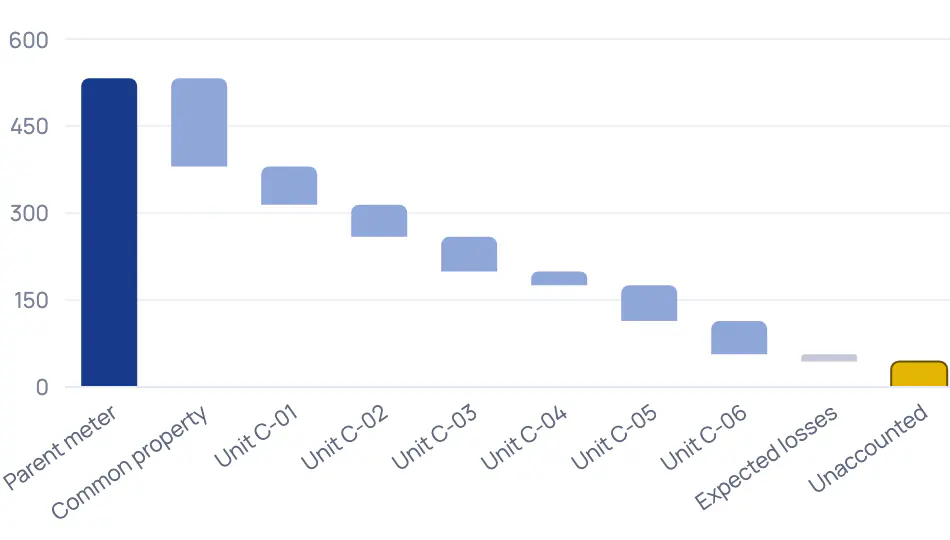
Compared only where every meter has complete data, so a gap in the readings is never mistaken for a loss.
It points to the unit whose meter dropped when the loss began, and says how much of the gap that explains. Then it asks for a physical inspection.
We capture the municipal bill per site and utility, then compare it with what the units were billed: over-recovered, within expected loss, or an unexplained gap.
Borehole pumps, lifts, common lights and the municipal intake, each with its own half‑hours.
Catch problems early
Water flowing all night is flagged after three nights; a burst within hours. A running cistern shows up as a small, steady trickle. Every finding counts the litres lost so far.

Each finding shows night-by-night flow and how sure we are. Marking it Confirmed on site or False alarm tunes the next finding at your site.
Where a smart valve is fitted, a burst closes the water and everyone at home is told. One tap reopens it.
Leaks, losses and silent meters arrive in one list, each linked to its meter and its evidence.
A resident raises a problem with their home or a meter and follows the replies, so a call-out never gets lost.
Bill and collect
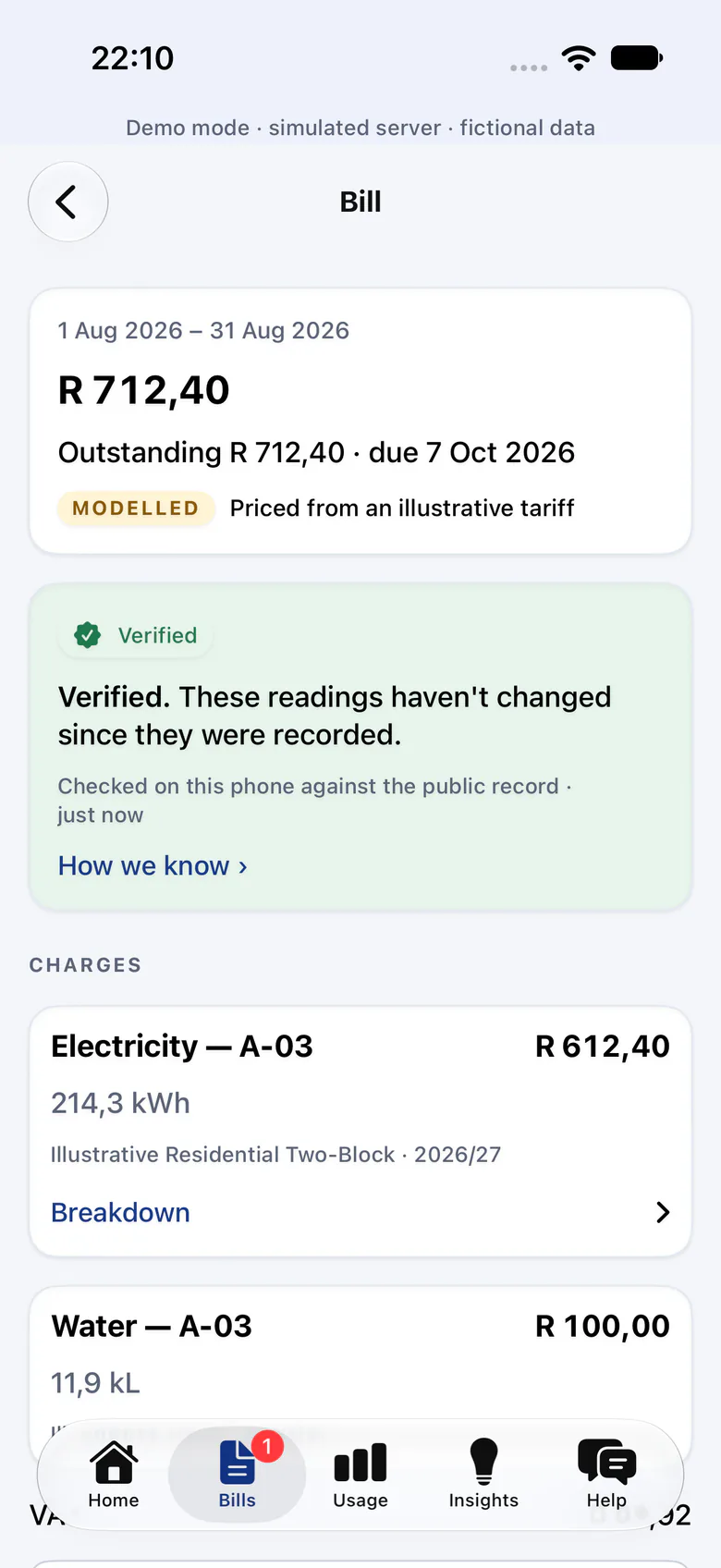
Every bill carries a QR code. Scan it, and your own phone checks that the readings behind it haven't changed since they were recorded. If a dispute still reaches the Community Schemes Ombud Service (CSOS), the evidence is one download away.
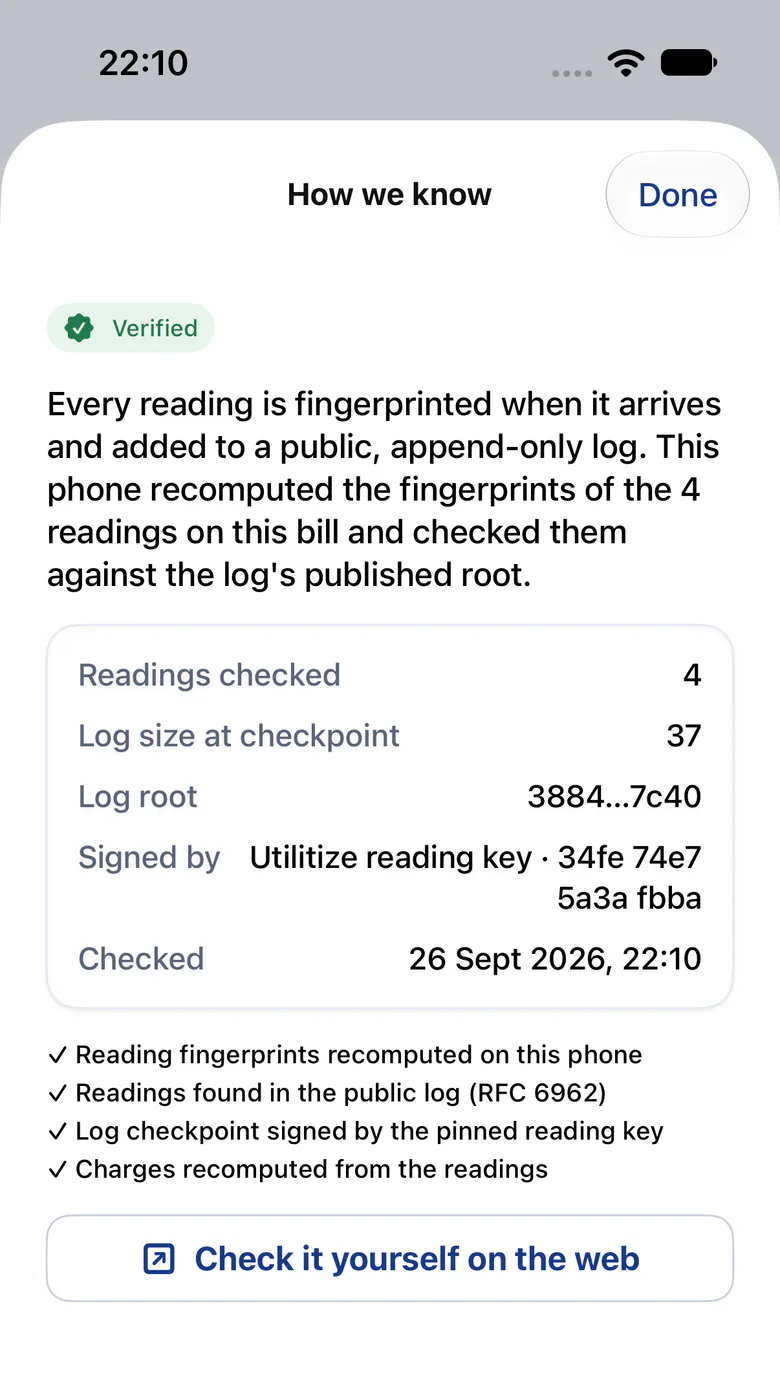
The check runs on the owner's own phone or browser, against a public, append-only log. It proves the readings, not the meter.
Per meter and period: the readings with their proofs, the invoices and the tariff versions applied.
Usage times the tariff, per meter, from actual readings. An incomplete statement is held back, never sent quietly.
Bill and collect
The software runs the month-end; your managing agent approves the exceptions. Missing readings, a missing tariff or a pending move-out stop the run until a person decides.

Validate, draft, issue, remind and reconcile run as steps. Issuing waits while any warning or critical exception is open.
At 7, 21 and 35 days, then they stop. The wording is tested never to mention disconnection.
We don't bill levies; we feed your levy software by CSV. Statements and 30‑minute data export to CSV and Excel.
Billed, collected and outstanding, meter coverage and open findings, made and sent with the month-end.
Bill and collect
On smart meters, prepaid needs no token and no keypad. Going prepaid starts with a special resolution, so Utilitize drafts the pack for your AGM.
There's no token to type. Residents top up in two taps, and the meter confirms the power is on.
A three-year cost projection and draft special-resolution wording, headed "TEMPLATE, have this reviewed".
Credit that tides a tenant over when the balance runs out, repaid from later top-ups with no fee or interest.
A fictional example
This runs on Utilitize's fictional demo complex, Silver Oaks. The figures come from the screen above, in this capture; the simulated scenario's numbers drift over time.
Every half‑hour
The check meter on Block C's bulk supply is compared with units C‑01 to C‑06 and the common property, only where every meter has complete data.
Monday, 21:00
Unaccounted energy rises above the loss band learned from this site's history. In this capture: 70,9 kWh more than the sub-meters account for, over nine days.
At the same moment
Unit C‑04 starts registering 62% less than its usual pattern for those hours, and the loss rises and falls with its load.
The finding
Utilitize raises a warning with its confidence and a plain "why we think this". It asks for a physical inspection before anyone is accused of anything.
Next
The trustees raise a work order. The result goes back in as Confirmed on site or False alarm, which tunes future findings at this site.
No real building, person or result. Detection is tuned on simulated data until our first pilot sites.
On site
What the signals and bills on this page need. A registered electrician fits meters to our specification, and we check every meter's first reading.
A check meter on each bulk supply
The loss and bypass signals compare it with the units. It's the one piece of hardware they can't do without.
Smart electricity meters on the units
Meters that report every half‑hour. Keypad meters can't give half‑hourly data.
Smart water metersFor leak alerts
Night-flow and cistern checks need readings every 30 minutes.
A way for readings to reach us
Meters on a provider's network, or a gateway per distribution board.
A smart valve per unitOptional
Only where you want a burst to close the water by itself.
We'll tell you honestly what we can read.
We're working on options for keypad sites. Tell us about your meters.
Questions
Usually because residents pay instead: a cut of every purchase, often with a monthly meter fee on top.
We don't take a percentage of anyone's electricity or water, and Utilitize charges tenants no fees.
No. Keep it. We don't bill levies; we feed your levy software by CSV.
We're working on options for keypad sites. Tell us about your meters and join the keypad list; we'll send one message when it's ready.
Keypad meters can't give half‑hourly data, so the loss and leak signals need smart meters.
The software runs the month-end, and your managing agent approves the exceptions. Smart meters send their own readings, so nobody types them in.
Not always. Bring the meters you have, and we'll tell you honestly what we can read.
The loss signals need a check meter on each bulk supply, and leak alerts need smart water meters that report every 30 minutes.
Utilitize is built around POPIA. It's built to encrypt personal details per organisation, and erasing a person destroys their key. Money and access changes need a fresh identity check, and the audit log shows tampering. There's been no external audit yet.
Bring last month's municipal bill.