
Live demo
Book a 30-minute walkthrough
On a live call, we show you the real Utilitize platform on demo data, focused on what matters for your property.
Commercial review call
- Length
- 30 minutes
- How
- A video call. We send you the link.
- With
- Our founder, an electrical engineer
- You'll see
- Half-hourly data, maximum demand, power factor and losses
- Bring
- Three months of bills for your largest supply
Request your walkthrough
Two short steps: your property, and you. Add more detail if you like.
What happens next
We read your request
We read every request ourselves, and prepare the walkthrough for your property.
We send you an invite
By email, with a time for the call and a video link. If it doesn't suit you, reply and we'll find another.
We meet on a live call
30 minutes on the real platform, on demo data, focused on your property.
You get a recap
What you saw and what we'd need from you. If it fits, a proposal follows.
Rather write to us?
The call
What happens in the 30 minutes
Half of the call is the product, on your kind of property. The rest is your questions, and an honest answer about fit.
2 minutes
Hello and the agenda
We ask before recording anything. A recording is only for our notes, and we delete it once the recap is written.
8 minutes
Your questions, and ours
Your property, your meters and what isn't working today.
15 minutes
The real platform, on demo data
The screens that matter for your property, steered by what you've told us.
5 minutes
An honest fit, and the next step
Whether Utilitize fits, what we'd need from you (the meter list, bills and your meeting date) and what happens next.
After the call you get a short recap by email. If it fits, a proposal follows once we have your meter list and bills.
What we show
What we show, by property
Every walkthrough uses the real platform on fictional demo data. We pick the screens that matter to you, and say what each one needs.
Body corporates
- Every unit and the common property on one screen.
- The bulk meter against the units: where water and power go missing, since when and how sure we are.
- Leak cards, a month-end you approve, and a bill with a QR code any owner can check.
Losses need a check meter, and the checks are tuned on simulated data. We prove them on your building first.
Estates
- Each bulk supply against every home, so you see where water and power go missing.
- Night-flow leaks, running cisterns and bursts, with the evidence and how sure we are.
- A month-end that runs itself, with the exceptions for you to approve.
Leak checks need smart water meters with 30-minute readings, and are tuned on simulated data.
Managing agents
- All your schemes in one place, with a month-end control tower that shows what needs a person.
- A scheme onboarded from spreadsheets: a dry run, an all-or-nothing apply and a real undo.
- Roles with end dates, “view as” and an audit log, with each managing agent walled off from the next.
We set up each managing agent's organisation with you.
Landlords
- Every flat on one screen, with tenancies that keep their history.
- Tokenless prepaid on smart meters: tenants top up in two taps, and the meter confirms the power is on.
- Each flat's usage, half-hour by half-hour, and statements you can export to CSV.
Top-ups run in a payment sandbox until payments go live.
Your walkthrough
Commercial and industrial
- Half-hourly data per tenant meter, with maximum demand and power factor where meters report kVA.
- The demand limiter, run against last month's data to show which loads it would have shed.
- The gap between your incomer and your tenants, and exports for finance.
Commercial recovery billing is in preparation, so it isn't part of the demo.
Solar
- Rooftop solar split between units every half-hour, under the rule your owners choose.
- Import, export and self-use kept apart on every meter.
- A warning when solar export drops well below its recent average.
The warning watches export, not generation.
Some of the screens you'll see
Real Utilitize screens on fictional data. Each one carries its status.
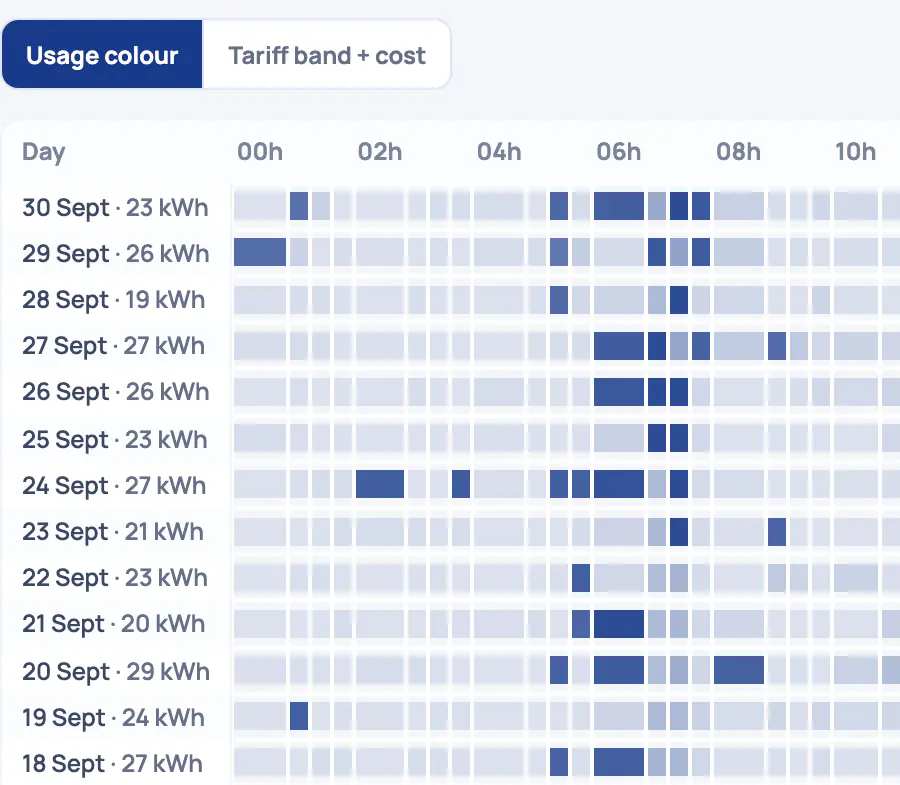
On smart meters.
- Every day, every half‑hour. Each row is one day and its total, split into 48 half‑hours. On 30 September this meter used 23 kWh.
- Peaks you can see. Darker cells used more. This meter peaks around 06:00, and again from about 17:00 to 21:00.
- Six views of the same data. Heatmap, time series, spikes, baseload, events and C&I. The heatmap can also colour each half‑hour by tariff band and cost.
- Export or share. Download the half‑hours as CSV or Excel, or copy a link to share.

Needs meters that report kVA.
- Peak, average and load factor. Over these 7 days: a 5,22 kW peak and a 1,95 kW average, so a 37% load factor. Higher means steadier use.
- Every half‑hour, highest first. The load duration curve sorts each half‑hour's demand against the share of time at or above it. Flatter means a better-used supply.
- Peaks against your notified maximum. Type in the notified maximum demand from your supply agreement and it's drawn across the chart. Here, 6 kVA.
- kVA only where it's measured. This meter reports no apparent power, so the screen says kVA isn't available instead of estimating it.
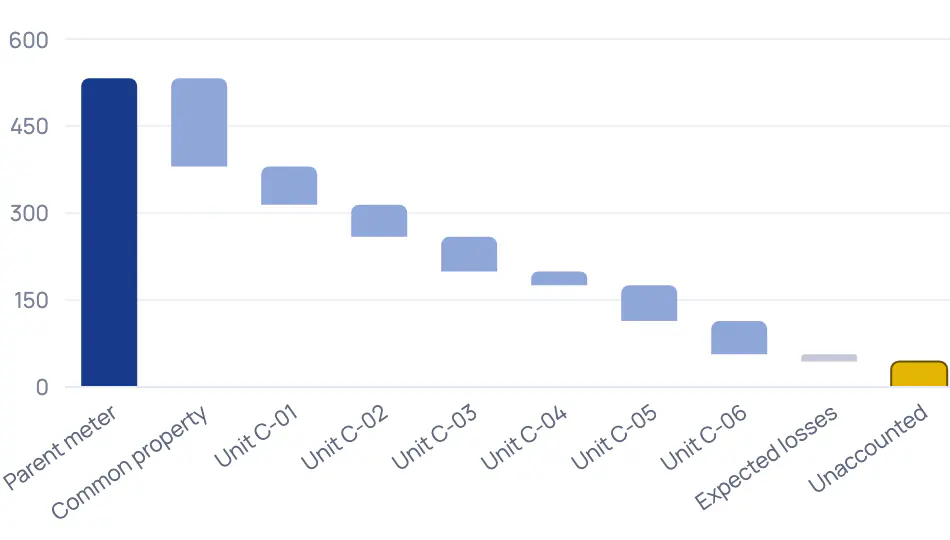
Needs a check meter. Tuned on simulated data.
- Where the energy went. The bulk meter's reading, then common property, units C‑01 to C‑06 and expected losses. The yellow bar is what's left unaccounted.
- Checked against a learned band. Each half‑hour's unaccounted energy is compared with the loss band learned from this site's own history.
- Why we think this. Plain-language reasoning: unit C‑04 started registering far less than its usual pattern at the same time, which explains most of the extra loss.
- Inspection before accusation. The finding stays a probability, with its confidence shown, and asks for a physical inspection before anyone is accused of anything.
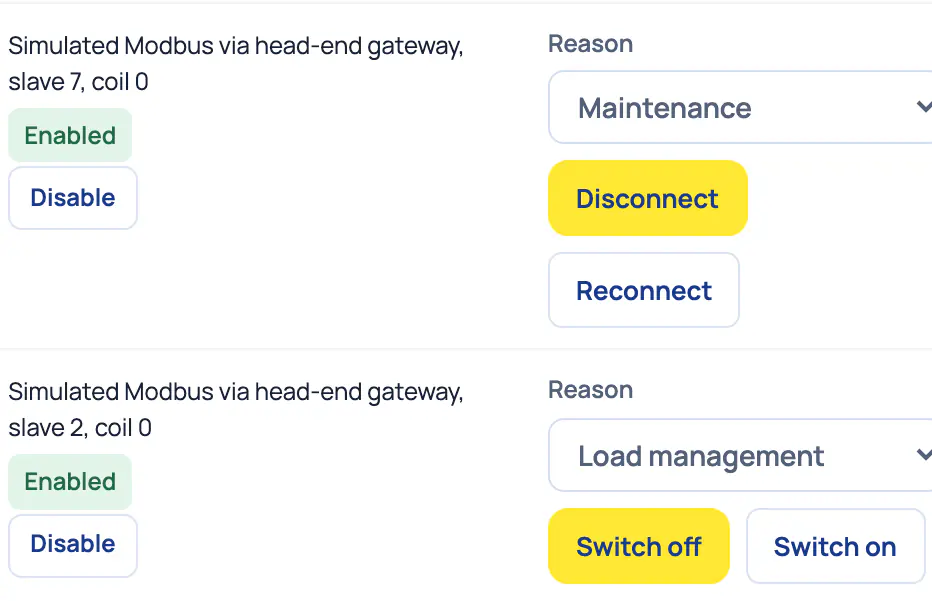
Needs a smart valve or relay.
- One switch stops automation. Stops every automated action and prepaid disconnection at once. Turning it back on needs a fresh confirmation.
- Confirmed, not assumed. The state column shows what the device reports back, not what was asked for. A‑02 Supply reads Connected.
- Real hardware starts disabled. A‑01 is real hardware. It stays disabled until a manager enables it, with a fresh confirmation.
- Switch with a reason. Disconnect a supply, switch a geyser or close a water valve, each with a reason. These devices are simulated.
What the labels mean
- Ready for pilots
- Built and tested. Ready for our first pilot sites.
- Built · goes live with …
- Built and tested on a sandbox or simulator. Goes live once the partner, hardware or service it names is in place.
- In preparation
- Designed, not built yet. No date until we commit to one.
Built and tested. We're choosing our first pilot sites.See what's built
Before you book
Is it a sales call?
It's a demo of the real platform, focused on your property, with time for your questions. At the end we tell you honestly whether Utilitize fits, and what the next step would be. If it doesn't fit, we say so.
Do we need smart meters already?
No. Bring the meters you have, and we'll tell you honestly what we can read. On smart meters that report readings, you see every unit, every half-hour.
Keypad prepaid meters: we're working on options for keypad sites. Join the keypad list.
Is Utilitize running at other properties yet?
Not yet. Utilitize is built and tested, and we're choosing our first pilot sites. On the call you see the real platform on fictional demo data, so nobody's meters or bills are on screen.
What does it cost?
Two ways: managed or platform. We go through both on the call, for your property. Managed: we supply, own and look after the meters. Platform: you buy the meters from us and run them yourself on Utilitize. Both are quoted after a site survey. We don't take a percentage of anyone's electricity or water, and Utilitize charges tenants no fees.
Can we see the product without a call?
Yes, screen by screen. The platform page shows real screens on fictional data, each with what it does and its status. The call is where you see it work end to end, for your kind of property.
What happens to the details we send?
We use them only to reply and prepare your walkthrough. The form emails them to our mailbox, and the website keeps no copy. The privacy notice has the details.
Ready when you are. Book your 30-minute walkthrough.
Bring three months of bills for your largest supply.